Domain Spoofing Warning Signs and Immediate Response Steps
Most domain spoofing attacks rely on subtle visual tricks that bypass standard filtering, requiring manual verification of DNS records to confirm sender authenticity.
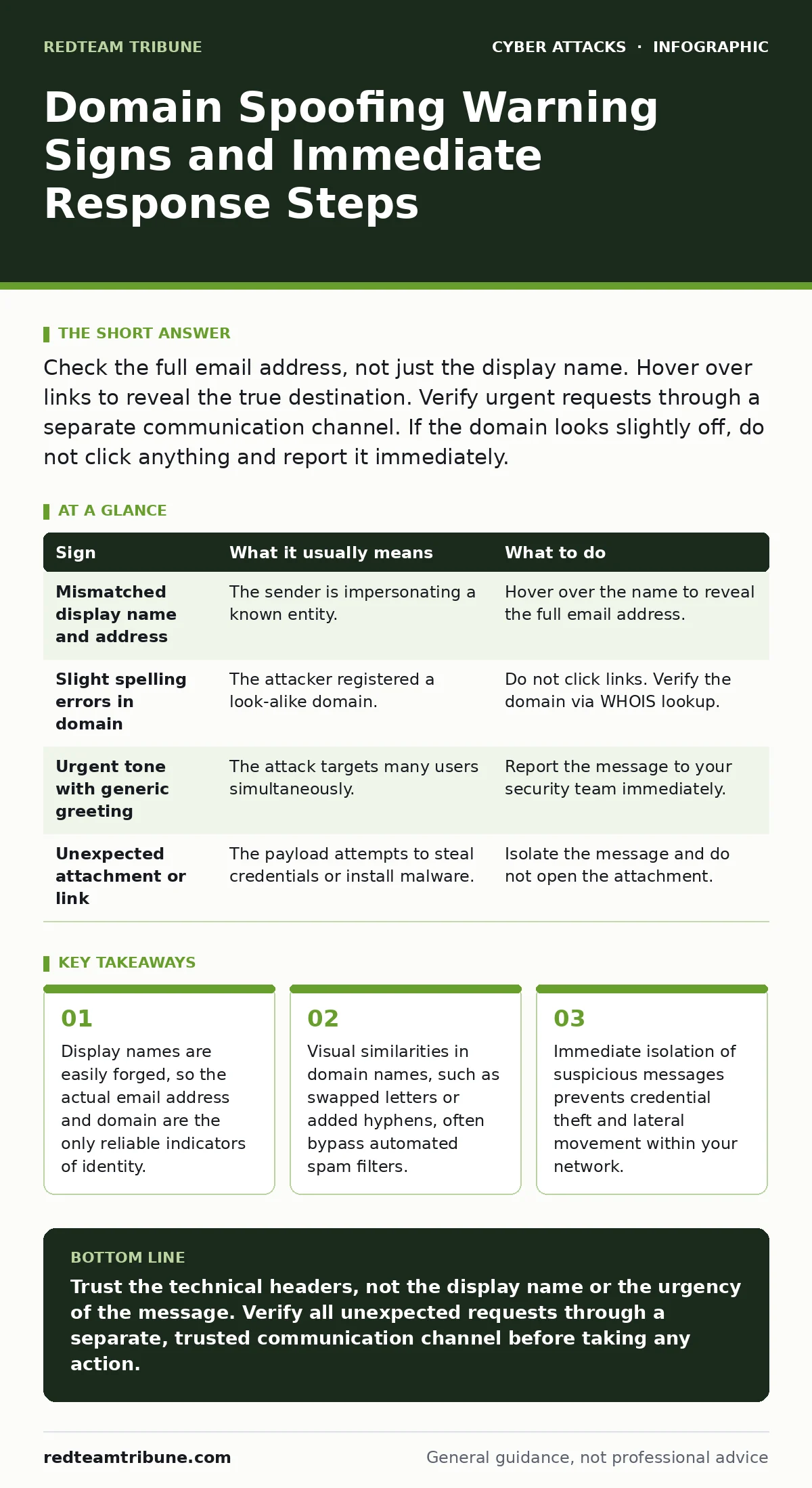
Check the full email address, not just the display name. Hover over links to reveal the true destination. Verify urgent requests through a separate communication channel. If the domain looks slightly off, do not click anything and report it immediately.
The Illusion of Trust in Display Names
Attackers exploit the way email clients present sender information. You see a friendly name, like "IT Support" or a known vendor, but this display name is purely cosmetic. It carries no cryptographic weight. The actual sender address, often hidden below the name, reveals the true origin. This separation allows attackers to impersonate trusted entities without owning the legitimate domain.
Imagine receiving a message from "CEO" asking for urgent payment. The display name matches your executive perfectly. However, the underlying email address belongs to a free public provider. This discrepancy is the first major red flag. Many users focus solely on the name and miss the address entirely.
Detecting Visual Homoglyphs and Typos
Human eyes are poor at distinguishing subtle character differences. Attackers use homoglyphs, which are characters from different scripts that look identical to Latin letters. For example, a Cyrillic "a" looks exactly like a Latin "a" in many fonts. They also use typosquatting, swapping adjacent keys or omitting letters.
These tricks exploit cognitive bias. You expect to see a familiar domain, so your brain auto-corrects the slight error. A domain like "paypa1.com" or "g00gle.com" may look correct at a glance. This is why automated filters sometimes fail; the domain is technically valid and distinct from the legitimate one.
| Sign | What it usually means | What to do |
|---|---|---|
| Mismatched display name and address | The sender is impersonating a known entity. | Hover over the name to reveal the full email address. |
| Slight spelling errors in domain | The attacker registered a look-alike domain. | Do not click links. Verify the domain via WHOIS lookup. |
| Urgent tone with generic greeting | The attack targets many users simultaneously. | Report the message to your security team immediately. |
| Unexpected attachment or link | The payload attempts to steal credentials or install malware. | Isolate the message and do not open the attachment. |
Hidden Technical Indicators
Beyond the visual layer, the email headers contain the truth. You can inspect the message source to see the actual path the email took. Look for the "Return-Path" and "Received" headers. If the email claims to come from a corporate domain but the headers show it originated from a residential IP address, it is spoofed.
Authentication protocols like SPF, DKIM, and DMARC help verify sender legitimacy. SPF checks if the sending server is authorized. DKIM verifies that the message was not altered in transit. DMARC policy dictates how to handle failures. If these checks fail, the email should be rejected or quarantined.
The Danger of Contextual Manipulation
Attackers often use compromised legitimate accounts to send phishing emails. In this case, the domain is real, and the headers are clean. The message appears to come from a colleague. This bypasses technical controls because the authentication passes. The only warning sign is unusual content or timing.
Suppose your manager sends an email from their actual corporate account asking for your login credentials. The domain is correct. The headers are valid. The content is the only anomaly. This scenario highlights why technical controls alone are insufficient. You must also monitor for behavioral anomalies.
Immediate Response Protocols
When you spot a potential spoof, do not reply. Replying confirms your address is active. Instead, isolate the message. Move it to a separate folder or mark it as spam. Do not delete it immediately, as forensic analysis may require the headers.
Report the incident to your security operations centers. Provide the full headers and the suspicious content. This allows analysts to update filters and block the attacker. Quick reporting reduces the window of opportunity for the attacker to target others.
See also: How Email Attachment Scanning Works: The Hidden Mechanics · DDoS Attack Mechanics: Answers to 10 Critical Questions
Long-Term Defensive Strategies
Prevention requires a layered approach. Implement strict DMARC policies to reject emails that fail authentication. This stops many spoofing attempts at the edge. Regularly audit your DNS records to ensure they are correctly configured.
Employee training is also critical. Users must understand that display names are unreliable. They should verify urgent requests through a secondary channel, such as a phone call or a separate messaging platform. This verification step breaks the attack chain.
Consider network segmentation to limit the impact if an attacker gains access. Even if a user clicks a link, segmentation prevents lateral movement. This reduces the blast radius of a successful compromise.
Integrating Broader Security Measures
Domain spoofing is often part of a larger attack campaign. Attackers may use QR code phishing to bypass email filters entirely. The QR code directs users to a malicious site. You should treat QR codes with the same suspicion as email links.
Insider threats can also mimic spoofing. A disgruntled employee may send malicious emails from their account. Monitoring for unusual login locations and times helps detect this. Firewalls alone cannot stop these attacks if the traffic is encrypted and legitimate.
Adversary-in-the-middle phishing involves intercepting communications in real-time. This is harder to detect than simple spoofing. Vigilance and multi-factor authentication are your best defenses. Always verify the identity of the person you are communicating with, especially for sensitive transactions.
Key takeaways
- Display names are easily forged, so the actual email address and domain are the only reliable indicators of identity.
- Visual similarities in domain names, such as swapped letters or added hyphens, often bypass automated spam filters.
- Immediate isolation of suspicious messages prevents credential theft and lateral movement within your network.
Trust the technical headers, not the display name or the urgency of the message. Verify all unexpected requests through a separate, trusted communication channel before taking any action.
Frequently asked questions
Can I trust an email if it comes from a known domain?
Not necessarily. Attackers can compromise legitimate accounts or use subdomains that bypass basic filters. Always verify the content and context.
How do I check email headers?
Most email clients allow you to view the original message or source. Look for options like "Show Original" or "View Source" in the menu.
What is DMARC and why does it matter?
DMARC is a protocol that tells receiving servers what to do with emails that fail authentication. It prevents spoofing by enforcing strict policies.
Should I delete suspicious emails immediately?
No. Forward them to your security team first. Deleting them destroys evidence that could help block future attacks.
How this guide was produced: written by the RedTeam Tribune editorial team with AI assistance, checked against the public references listed below, and reviewed when the facts change. See our editorial policy or report an error.