How Email Attachment Scanning Works: The Hidden Mechanics
Scanning engines often fail to detect threats because they analyze static files rather than observing behavior in isolated, disposable environments.

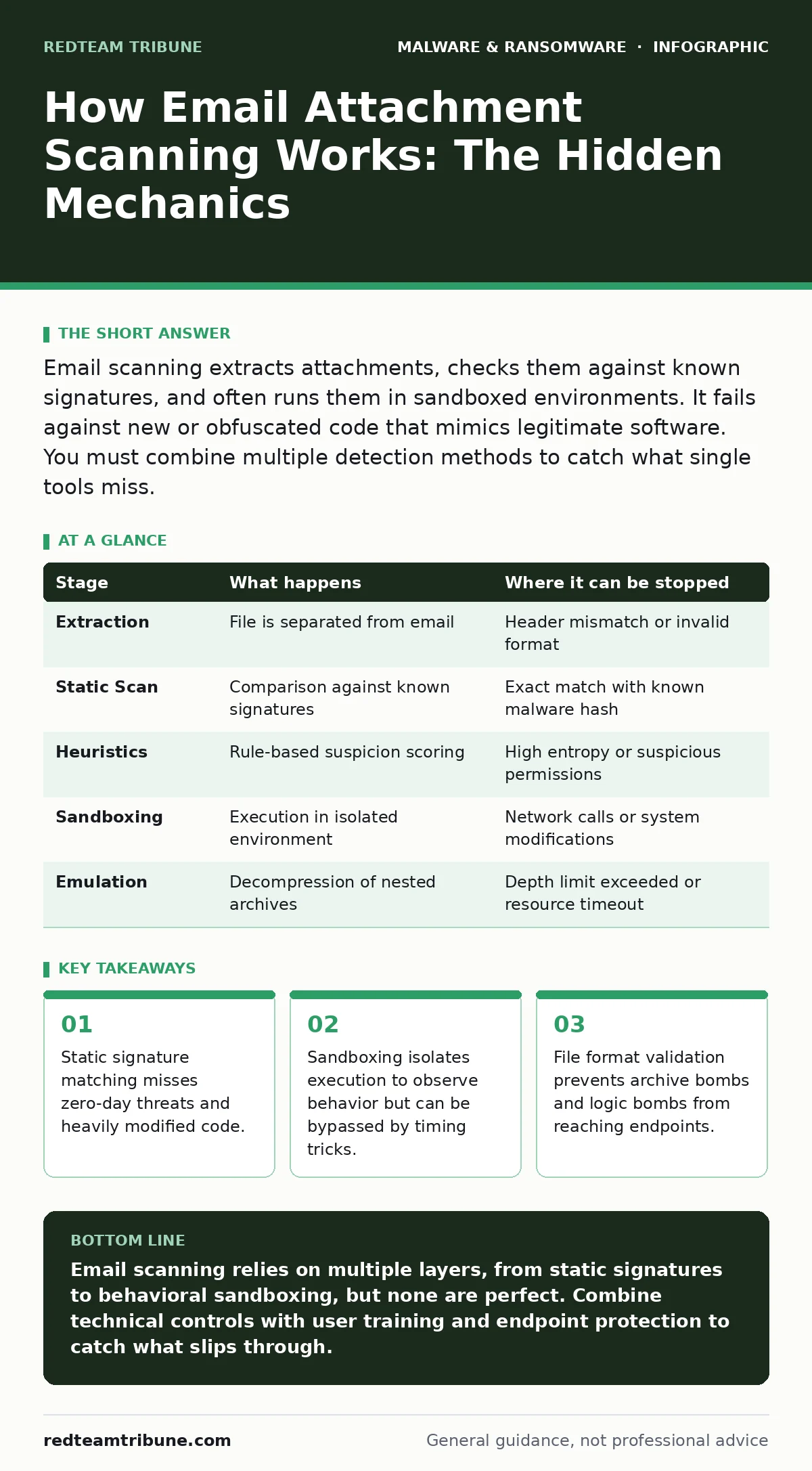
Email scanning extracts attachments, checks them against known signatures, and often runs them in sandboxed environments. It fails against new or obfuscated code that mimics legitimate software. You must combine multiple detection methods to catch what single tools miss.
The Ingestion and Extraction Phase
When an email arrives at your gateway, the system does not simply look at the attachment. It intercepts the message before it reaches the mailbox. The first step is extraction. The scanner strips the attachment from the email envelope and saves it as a standalone file. This separation allows the system to analyze the file without the context of the email headers or body.
Imagine a user receives a PDF that contains hidden executable code. The scanner extracts this PDF. It checks the file header to verify the declared type matches the actual content. If the header says "image" but the bytes look like "executable," the system flags a mismatch. This basic validation catches simple renaming tricks where a malicious actor changes virus.exe to invoice.pdf.
Stage 1: Static Signature Matching
The extracted file enters the static analysis queue. Here, the system compares the file’s binary code against a database of known malicious patterns. This database contains hashes and code snippets from previously identified malware. If the file matches a known entry, the system blocks it immediately. This method is fast and consumes minimal resources.
However, this approach relies entirely on prior knowledge. It cannot see threats that have never been reported. If an attacker modifies the code slightly, the hash changes. The signature no longer matches. The file passes through as clean. This is why static scanning alone leaves a significant gap. It protects against yesterday’s threats but ignores today’s innovations.
Stage 2: Heuristic and Reputation Checks
Static signatures fail against new code, so the system applies heuristic analysis. Heuristics are rules of thumb that identify suspicious characteristics rather than exact matches. The scanner looks for high entropy, which indicates encryption or compression often used to hide malicious code. It also checks for unusual permissions or packed executables.
Simultaneously, the system queries reputation services. These services track the history of file hashes and domains. If a file hash has been seen in other malicious campaigns, the reputation score drops. The combination of heuristic flags and poor reputation triggers a block. This layer catches variants of known malware that static signatures miss.
Imagine a document that uses complex macro commands to download a payload. The heuristic engine detects the unusual macro structure. Even if the macro is unique, the pattern of behavior matches known malicious templates. The system quarantines the file based on probability, not certainty.
Stage 3: Dynamic Analysis and Sandboxing
When static and heuristic checks are inconclusive, the file moves to dynamic analysis. This process runs the file in a sandbox. A sandbox is an isolated, virtual environment that mimics a real computer. The file executes inside this cage. The system monitors everything the file does. It watches for registry changes, network connections, and process creation.
This method reveals behavior that static code cannot show. A file might look harmless on paper but attempt to connect to a command-and-control server when run. The sandbox detects this network call. It also identifies if the file tries to disable security software or create new user accounts. These actions are strong indicators of malicious intent.
However, sandboxes have limits. They are not perfect replicas of real systems. They often lack the specific software versions or network configurations of your actual environment. Attackers know this. They design malware to detect sandbox environments. If the code senses it is in a virtual machine, it remains dormant. It waits for a real user to open it.
Stage 4: Emulation and Decompression
Some files are compressed or encrypted to hide their contents. The scanner must decompress or decrypt them to see what is inside. This step uses emulation. Emulation runs the file in a simulated hardware environment. It allows the system to unpack layers of archives without risking the host system.
This is critical for nested archives. An attacker might place a malicious file inside ten layers of ZIP files. The scanner peels back each layer. If any layer contains a threat, the entire email is blocked. This process is computationally expensive. It slows down email delivery because the system must process each layer sequentially.
See also: Domain Spoofing Warning Signs and Immediate Response Steps · Spot Keyloggers Early: Warning Signs and Removal Steps
Limitations and Blind Spots
No scanning mechanism is perfect. The biggest blind spot is logic. Scanners analyze code and behavior, not intent. A file can be technically clean but conceptually dangerous. For instance, a spreadsheet might contain a formula that triggers a macro when opened. If the macro is written in a way that heuristic rules do not recognize, it passes.
Another limitation is the delay. Dynamic analysis takes time. During this window, the user waits for the email. Attackers exploit this by sending time-sensitive messages. The urgency pressures users to bypass security or use alternative channels. This social engineering aspect bypasses technical controls entirely.
You must also consider the impact on legitimate workflows. Overly aggressive scanning blocks useful files. This creates friction. Users find ways to circumvent the system, such as sending files through chat applications or cloud storage links. These alternative channels often lack the same level of scrutiny.
Integrating Defense Layers
To close these gaps, you must integrate multiple defenses. Email scanning is only one layer. You need endpoint protection that monitors behavior on the user’s device. If a file slips through the gateway, the endpoint solution should detect its malicious actions.
Consider implementing attack surface reduction rules to restrict which applications can execute files. For example, you can prevent email clients from launching executable files. This stops the chain of execution even if the file is delivered. You should also educate users on macro malware risks. Many users enable macros without understanding the consequences.
Suppose a file passes all scans because it is a new variant. The endpoint protection detects its attempt to modify system files. The dynamic malware analysis capabilities of the endpoint solution catch what the email gateway missed. This layered approach ensures that one failure does not lead to a breach.
| Stage | What happens | Where it can be stopped |
|---|---|---|
| Extraction | File is separated from email | Header mismatch or invalid format |
| Static Scan | Comparison against known signatures | Exact match with known malware hash |
| Heuristics | Rule-based suspicion scoring | High entropy or suspicious permissions |
| Sandboxing | Execution in isolated environment | Network calls or system modifications |
| Emulation | Decompression of nested archives | Depth limit exceeded or resource timeout |
The Human Factor
Technical controls are necessary but insufficient. Users remain the weakest link. They open files that scanners miss. They enable macros that look legitimate. You must train users to recognize suspicious attachments. This is not about vigilance; it is about pattern recognition.
Teach users to verify the sender. A CEO asking for urgent gift cards via email is a red flag. A PDF invoice from an unknown vendor is suspicious. These checks happen before the file is opened. They reduce the volume of files that reach the endpoint.
Integrate this training with your business continuity planning. If a breach occurs despite scanning, you need a plan to recover. Assume that some threats will get through. Your response plan should include isolating infected machines and restoring data from backups.
Key takeaways
- Static signature matching misses zero-day threats and heavily modified code.
- Sandboxing isolates execution to observe behavior but can be bypassed by timing tricks.
- File format validation prevents archive bombs and logic bombs from reaching endpoints.
Email scanning relies on multiple layers, from static signatures to behavioral sandboxing, but none are perfect. Combine technical controls with user training and endpoint protection to catch what slips through.
Frequently asked questions
Why do some malicious files pass email scanning?
Attackers use obfuscation techniques to hide code from static analysis and timing tricks to evade sandbox detection.
Does email scanning protect against all ransomware?
No, it reduces risk by blocking known threats and suspicious behavior, but new variants can bypass detection.
How does sandboxing differ from static scanning?
Static scanning checks code against known patterns, while sandboxing runs the file to observe its actual behavior.
What is the role of heuristics in email security?
Heuristics use rules to identify suspicious characteristics, catching new threats that lack known signatures.
How this guide was produced: written by the RedTeam Tribune editorial team with AI assistance, checked against the public references listed below, and reviewed when the facts change. See our editorial policy or report an error.