Federated Identity vs SSO: The Architectural Difference That Matters
Federated identity shifts trust across organizational boundaries, while single sign-on merely reuses credentials within a single trust domain.

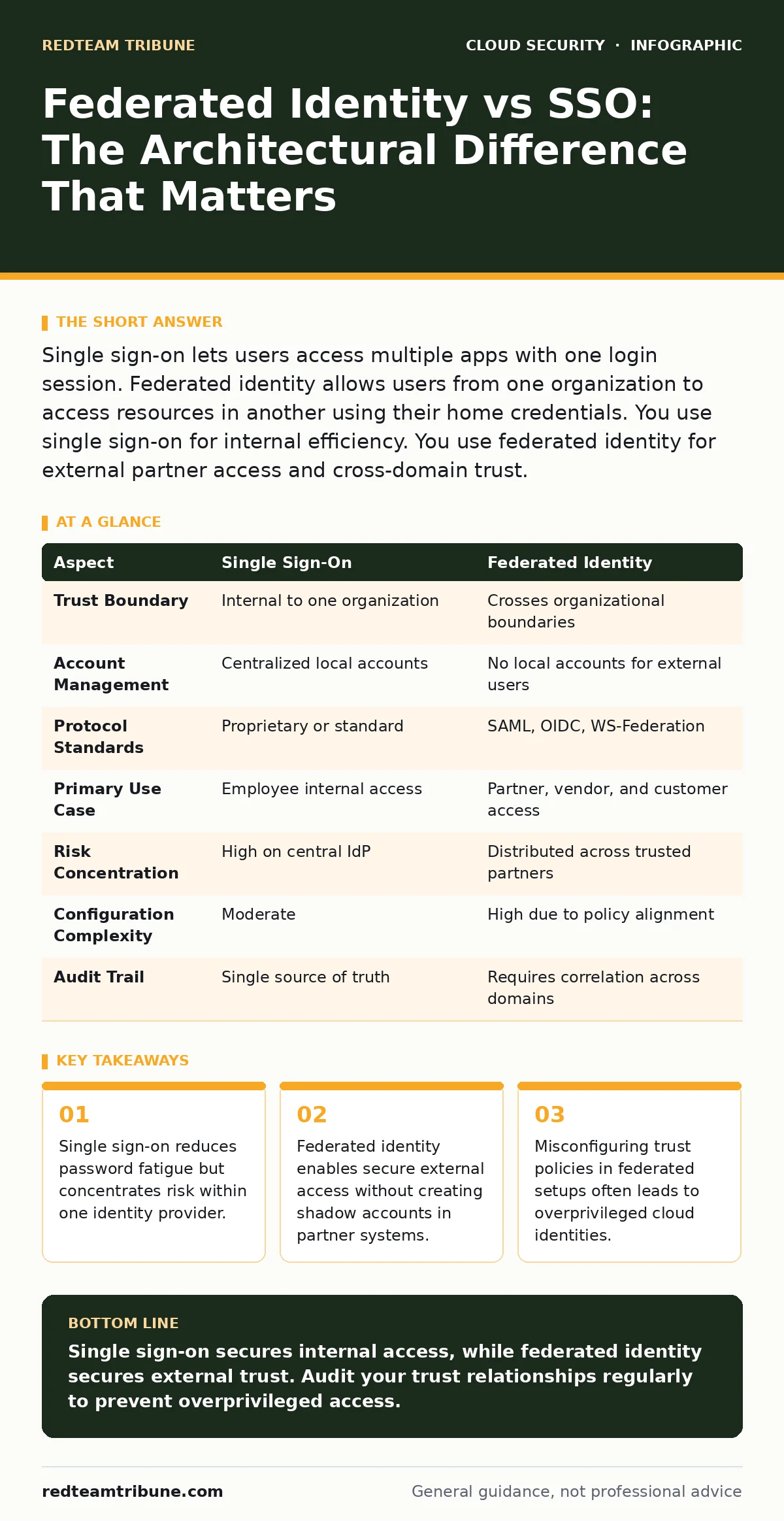
Single sign-on lets users access multiple apps with one login session. Federated identity allows users from one organization to access resources in another using their home credentials. You use single sign-on for internal efficiency. You use federated identity for external partner access and cross-domain trust.
The Core Difference Between Federated Identity and SSO
Federated identity and single sign-on serve different trust models. Single sign-on (SSO) allows a user to authenticate once and access multiple applications within the same organization without re-entering credentials. Federated identity extends this concept across organizational boundaries. It allows a user from Company A to access resources at Company B using Company A’s identity provider. The key distinction lies in trust. SSO trusts one central authority for all internal apps. Federated identity trusts an external authority to vouch for a user’s identity.
Imagine you manage a network where employees access email, CRM, and code repositories. SSO handles this internally. Now suppose a vendor needs access to your staging environment. Federated identity lets them use their own corporate login to access your tools. You do not create a local account for them. You trust their identity provider to tell you who they are. This separation of duties reduces administrative overhead and improves security posture.
What Is Single Sign-On?
Single sign-on is an authentication scheme that permits a user to access multiple applications with one set of login credentials. The mechanism relies on a central identity provider (IdP). When you log in, the IdP issues a token. Applications trust this token. They do not ask for a password again. This reduces the number of passwords users must remember. It also centralizes logout. When you end your session, access to all connected apps ends simultaneously.
The trade-off is centralization. If the identity provider is compromised, an attacker gains access to every connected application. You must secure the IdP rigorously. Multi-factor authentication becomes mandatory at the IdP level. Without it, a single stolen password unlocks your entire digital estate. This concentration of risk requires strict access controls and monitoring.
What Is Federated Identity?
Federated identity is a system that allows identity information to be shared among multiple organizations. It uses standard protocols like SAML or OIDC. These protocols define how the identity provider communicates with the service provider. The user logs into their home organization. The home organization sends a signed assertion to the target organization. The target organization accepts this assertion and grants access.
This model eliminates the need for local accounts for external users. You do not manage passwords for vendors, partners, or contractors. You manage trust relationships. You configure which attributes from the external IdP are accepted. This reduces the attack surface related to account creation and management. However, it introduces complexity in policy enforcement. You must ensure the external organization enforces security standards comparable to your own.
Federated Identity vs SSO: Point-by-Point Comparison
| Aspect | Single Sign-On | Federated Identity |
|---|---|---|
| Trust Boundary | Internal to one organization | Crosses organizational boundaries |
| Account Management | Centralized local accounts | No local accounts for external users |
| Protocol Standards | Proprietary or standard | SAML, OIDC, WS-Federation |
| Primary Use Case | Employee internal access | Partner, vendor, and customer access |
| Risk Concentration | High on central IdP | Distributed across trusted partners |
| Configuration Complexity | Moderate | High due to policy alignment |
| Audit Trail | Single source of truth | Requires correlation across domains |
When to Choose Single Sign-On
Choose single sign-on when you need to streamline access for internal employees. It reduces helpdesk tickets related to password resets. It ensures consistent policy enforcement across internal tools. You should implement SSO for all internal applications that support standard protocols. This includes email, file storage, and development tools.
SSO is the foundation of internal identity hygiene. It allows you to enforce strong authentication policies at a single point. You can require multi-factor authentication for all internal logins without configuring each app individually. This approach simplifies compliance audits. You can prove that all internal access went through a secured gateway.
See also: Implement Password Rotation Without Breaking Access Controls · Implement Access Key Rotation Without Downtime: A Step-by-Step Plan
When to Choose Federated Identity
Choose federated identity when you need to grant access to external entities. This includes vendors, partners, and customers. It prevents the creation of shadow accounts. Shadow accounts are hard to track and prone to overprivilege. Federated identity ensures that access is tied to the user’s home organization. If they leave their company, access ends automatically.
This model is critical for supply chain security. It allows you to verify the identity of external users without handling their passwords. You rely on their security posture. If their organization is breached, you may need to revoke trust. This requires clear incident response plans. You must define how quickly you can cut off access from a compromised partner.
Where They Overlap and Intersect
Single sign-on and federated identity often work together. An organization may use SSO for internal staff and federated identity for external partners. The internal identity provider can act as the federated identity provider for external requests. This creates a unified identity strategy. Users experience seamless access regardless of the resource location.
This integration requires careful configuration. You must ensure that internal users cannot access external resources unless authorized. Attribute mapping must be precise. You should not send sensitive internal attributes to external partners. This prevents data leakage. Regular cloud security assessments help identify misconfigurations in these trust relationships.
Managing the Combined Risk
The combination of SSO and federated identity increases the complexity of your attack surface. You must monitor both internal and external trust relationships. Look for unusual login patterns. Check for access from unexpected locations or devices. Implement cloud detection and response solutions to catch anomalies in real-time.
Regularly review access policies. Ensure that external partners still meet your security requirements. Remove trust relationships that are no longer needed. This prevents stale access from becoming a liability. Address workload identity separately. Service-to-service communication should not rely on human identity federation. Use machine identities for automated processes. This separation reduces the risk of lateral movement.
Key takeaways
- Single sign-on reduces password fatigue but concentrates risk within one identity provider.
- Federated identity enables secure external access without creating shadow accounts in partner systems.
- Misconfiguring trust policies in federated setups often leads to overprivileged cloud identities.
Single sign-on secures internal access, while federated identity secures external trust. Audit your trust relationships regularly to prevent overprivileged access.
Frequently asked questions
Can I use single sign-on for external partners?
You can, but it requires creating local accounts for them. This creates administrative overhead and security risks. Federated identity is better for external access.
Does federated identity replace passwords?
No. It replaces the need for local passwords. Users still authenticate with their home organization. That organization may still use passwords.
Is federated identity more secure than SSO?
It depends on the external provider. If the partner has weak security, federated identity introduces risk. SSO is only as secure as your central IdP.
How do I audit federated identity usage?
Use cloud detection and response tools to monitor login events. Correlate logs from your IdP and the service provider. Look for anomalies in access patterns.
How this guide was produced: written by the RedTeam Tribune editorial team with AI assistance, checked against the public references listed below, and reviewed when the facts change. See our editorial policy or report an error.