Implement Access Key Rotation Without Downtime: A Step-by-Step Plan
Rotating credentials without service interruption requires a parallel lifecycle where new keys operate alongside old ones until verification confirms seamless handover.

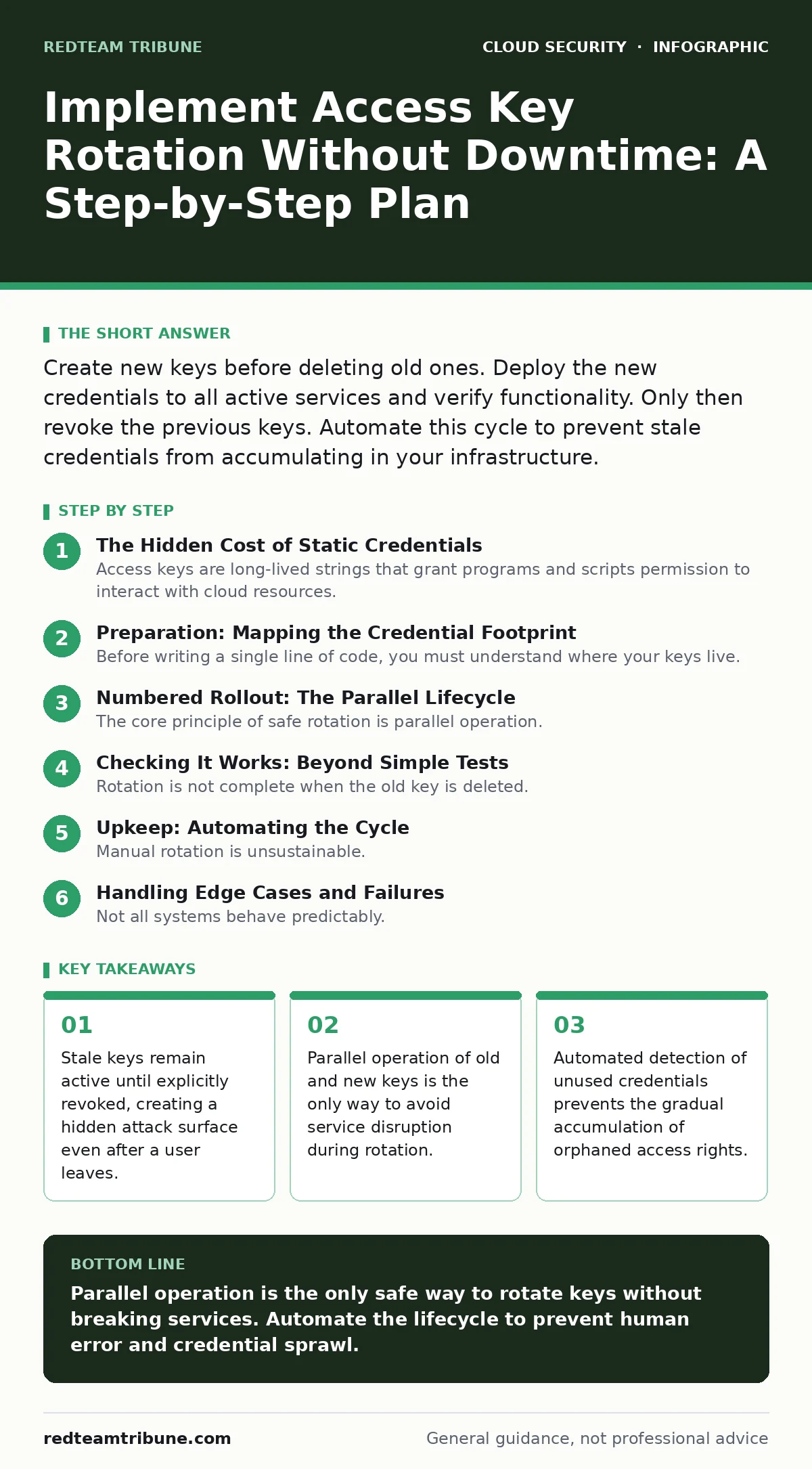
Create new keys before deleting old ones. Deploy the new credentials to all active services and verify functionality. Only then revoke the previous keys. Automate this cycle to prevent stale credentials from accumulating in your infrastructure.
The Hidden Cost of Static Credentials
Access keys are long-lived strings that grant programs and scripts permission to interact with cloud resources. Unlike human passwords, these keys rarely expire unless you force them to. This convenience creates a silent accumulation of access rights. Every script, CI/CD pipeline, and automated tool holds a key that works indefinitely.
Suppose a developer leaves your organization. Their human account is disabled, but the access key they used for a deployment script remains active. That key becomes a permanent backdoor. Attackers scan for these orphaned credentials in public repositories and exploit them to pivot into your environment. This is a primary vector for cloud cryptojacking, where malicious actors hijack compute resources to mine cryptocurrency.
Rotation is not merely a compliance checkbox. It is a mechanism to limit the window of exposure for any single credential. If a key is compromised, rotation cuts off the attacker’s access. Without regular rotation, a compromised key grants permanent entry.
Preparation: Mapping the Credential Footprint
Before writing a single line of code, you must understand where your keys live. Most organizations underestimate the number of active access keys. They exist in environment variables, configuration files, secret managers, and hardcoded application logic.
Conduct a cloud security posture management (CSPM) audit to identify all active keys. Filter for keys that have not been used in the last ninety days. These are your low-hanging fruit. They pose risk but are easy to rotate because they likely support inactive processes.
Identify the critical systems that depend on these keys. You cannot rotate a key used by a production database connector without a plan for zero downtime. Group your assets by criticality. Start with the least critical systems to build confidence in your process.
Numbered Rollout: The Parallel Lifecycle
The core principle of safe rotation is parallel operation. You must introduce the new key before removing the old one. This ensures that services continue to function during the transition.
Step 1: Generate the Replacement Key
Create a new access key for the identity in question. Do not delete the existing key yet. Store the new key securely in your secret management system. This step establishes the successor credential.
Verification: Confirm the new key exists in your identity management console. It should be in an "active" state, distinct from the old key.
Step 2: Deploy the New Key to Applications
Update the configuration of the application or script that uses the key. This often involves updating an environment variable or a secret store entry. Do not restart the service immediately if possible. Many modern applications can reload configuration without a full restart.
Verification: Check the application logs for successful authentication using the new key. Look for API calls that return success codes rather than authentication errors.
Step 3: Validate Functionality with Both Keys
Run a series of functional tests against the service. Ensure that the new key can perform all required actions. This includes read, write, and delete operations as defined by the policy. Simultaneously, ensure the old key still works. You need this overlap to catch any configuration errors before you cut the tether.
Verification: Execute a test transaction or API call using the new key. Confirm the result matches expectations. Then, execute the same call with the old key to ensure it has not been prematurely disabled.
Step 4: Revoke the Old Key
Once validation is complete, revoke the old access key. This action immediately invalidates the credential. Any subsequent attempt to use it will fail. This step closes the window of exposure for the previous credential.
Verification: Attempt to use the old key in a test environment. The system must return an access denied or invalid credential error. This confirms the old key is dead.
Checking It Works: Beyond Simple Tests
Rotation is not complete when the old key is deleted. You must verify that the new key is actually being used in production. Many teams assume success because the deployment was clean, but the application may still be using a cached token or a fallback key.
Monitor authentication logs for the new key ID. You should see a steady stream of successful requests. If you see no activity, the application is likely not using the new key. Investigate the configuration again.
Use DevSecOps pipelines to automate this verification. Each deployment should include a health check that validates the active credential. This shifts the verification left, catching errors before they reach production.
Upkeep: Automating the Cycle
Manual rotation is unsustainable. Humans forget, and keys accumulate. You must automate the lifecycle of access keys. Use infrastructure as code to define the rotation schedule.
Set up alerts for keys that approach their expiration date. If you are using short-lived credentials, the rotation happens automatically. If you are using long-lived keys, schedule a rotation every ninety days. This is a common industry standard, but you can adjust based on your risk tolerance.
Integrate rotation into your cloud landing zones. Define the baseline security requirements for every new account. Include key rotation policies as part of the initial setup. This ensures that new environments are secure from day one.
See also: 7 Common CASB Mistakes That Create Blind Spots · Stop Cloud Data Exfiltration: Small Business Risks and Low-Cost Fixes
Handling Edge Cases and Failures
Not all systems behave predictably. Some legacy applications require a full restart to pick up new credentials. Others cache tokens for extended periods. You must identify these edge cases during the preparation phase.
For systems that require a restart, schedule the rotation during a maintenance window. Communicate the downtime to stakeholders. For systems that cache tokens, implement a mechanism to invalidate the cache when the key changes.
If the new key fails validation, roll back immediately. Re-enable the old key if you have not yet revoked it. Investigate the failure before attempting rotation again. Never leave a system in a state where no valid key is available.
The Role of Policy and Governance
Technical controls are only half the battle. You need a policy that mandates rotation. Define who is responsible for each key. Establish a timeline for rotation. Hold teams accountable for compliance.
Regularly review access policies. Ensure that keys have the least privilege necessary. A rotated key with excessive permissions is still a risk. Combine rotation with periodic access reviews to minimize the impact of a compromise.
Key takeaways
- Stale keys remain active until explicitly revoked, creating a hidden attack surface even after a user leaves.
- Parallel operation of old and new keys is the only way to avoid service disruption during rotation.
- Automated detection of unused credentials prevents the gradual accumulation of orphaned access rights.
Parallel operation is the only safe way to rotate keys without breaking services. Automate the lifecycle to prevent human error and credential sprawl.
Frequently asked questions
How often should I rotate access keys?
Rotate long-lived keys every ninety days. Short-lived tokens should expire within hours or days, depending on your security requirements.
Can I rotate keys for production systems without downtime?
Yes, by using parallel operation. Introduce the new key, verify it works, then revoke the old one. This requires support from your application architecture.
What if I lose the old key before deploying the new one?
You must create a new key and deploy it. The old key is gone, but the identity remains valid. This is a temporary disruption, not a permanent lockout.
How do I detect if a key has been compromised?
Monitor for unusual activity, such as access from new IP addresses or unexpected API calls. Use automated tools to alert on anomalies in real time.
How this guide was produced: written by the RedTeam Tribune editorial team with AI assistance, checked against the public references listed below, and reviewed when the facts change. See our editorial policy or report an error.