Adversary Emulation Best Practices: Realistic Threat Simulation
Most emulation programs fail because they prioritize tool execution over behavioral fidelity, missing the subtle data exfiltration patterns that actually compromise organizations.

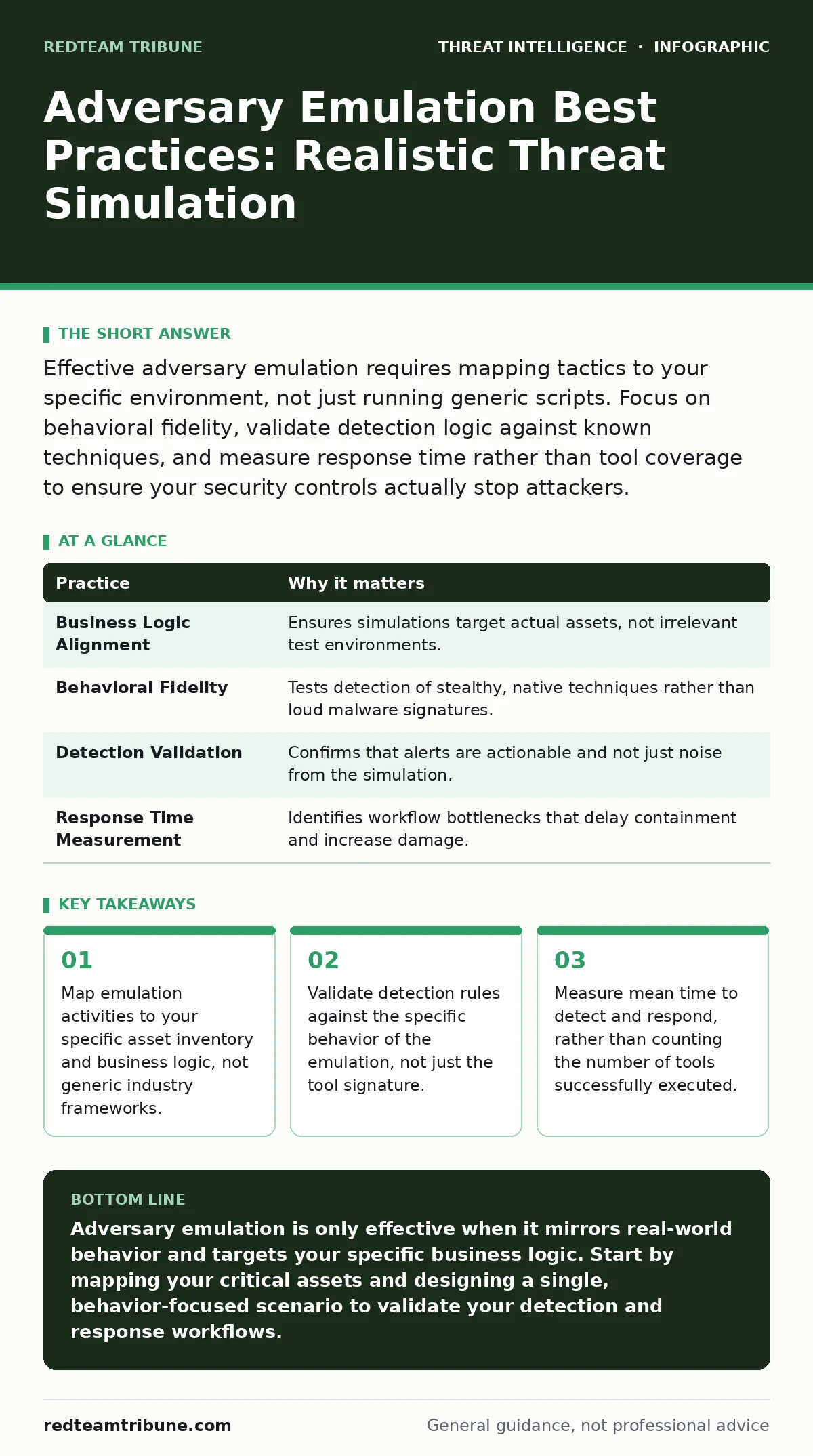
Effective adversary emulation requires mapping tactics to your specific environment, not just running generic scripts. Focus on behavioral fidelity, validate detection logic against known techniques, and measure response time rather than tool coverage to ensure your security controls actually stop attackers.
Align Emulation with Business Logic
Generic attack scripts often miss the specific value chains your organization protects. If you simulate a breach against a test server that holds no real data, your detection engineers cannot learn how to spot the theft of actual intellectual property. You must identify which data flows are most critical and design emulation scenarios that target those specific pathways. This alignment ensures your security team practices defending what actually matters.
Prioritize Behavioral Fidelity Over Tool Noise
Attackers rarely use commercial malware that triggers immediate antivirus alerts. They use living-off-the-land binaries and native commands to blend in with normal administrative activity. If your emulation relies on obvious malicious payloads, your detection engineering team will only learn to catch loud, easy targets. Focus on mimicking the subtle behavioral patterns of real intruders, such as unusual PowerShell execution or atypical scheduled task creation. This approach forces your sensors to look for anomalies in behavior rather than known file hashes.
Validate Detection Logic Rigorously
Running an attack does not prove your defenses work. It only proves the attack script ran. You must verify that your security information and event management platform generated the correct alerts and that those alerts triggered the intended response playbooks. Without this validation, you have a blind spot that an actual intruder could exploit. Review every alert generated during the exercise to ensure it contains enough context for an analyst to act quickly. This step closes the gap between simulation and operational readiness.
Measure Response Time, Not Tool Coverage
The goal of emulation is to improve your organization’s ability to stop an intruder, not to prove that your tools can detect a specific command. Tracking how many tools you successfully executes gives you a false sense of security. Instead, measure the time between the initial malicious action and the containment of the threat. This metric reveals bottlenecks in your analyst workflows and alert triage processes. A slow response to a minor intrusion is often more damaging than a fast response to a major one.
| Practice | Why it matters |
|---|---|
| Business Logic Alignment | Ensures simulations target actual assets, not irrelevant test environments. |
| Behavioral Fidelity | Tests detection of stealthy, native techniques rather than loud malware signatures. |
| Detection Validation | Confirms that alerts are actionable and not just noise from the simulation. |
| Response Time Measurement | Identifies workflow bottlenecks that delay containment and increase damage. |
Avoid Alert Fatigue During Exercises
Flooding your security operations center with hundreds of alerts during an emulation exercise can desensitize analysts to real threats. If every simulation generates noise, analysts may begin to ignore alerts, assuming they are part of a test. This habit creates a dangerous culture of complacency that persists after the exercise ends. Design your scenarios to generate a manageable number of high-fidelity alerts that require genuine investigation. This approach maintains analyst alertness and ensures they treat every signal with appropriate gravity.
See also: Threat Intelligence Sharing Mistakes and How to Fix Them · Dark web threat intelligence implementation steps for early warnings
Integrate with Threat Intelligence Sharing
Isolated emulation programs often repeat the same known techniques, missing the latest adversary tactics. By integrating your emulation plans with broader threat intelligence sharing initiatives, you can adapt your scenarios to reflect current adversary behavior. This ensures your team practices against relevant threats, not outdated ones. Review shared indicators of compromise and tactical reports to inform your next simulation cycle. This keeps your defensive strategies current and effective against evolving threats.
Document and Share Lessons Learned
An emulation exercise provides no value if the insights remain trapped in a single report. You must translate findings into actionable changes in your detection rules, response playbooks, and analyst training. Share these lessons with both technical and non-technical stakeholders to build a culture of continuous improvement. Documenting why certain detections failed or succeeded helps future teams avoid the same pitfalls. This knowledge transfer turns a one-time test into a lasting security enhancement.
Review False Positives in Threat Detection
Every emulation exercise will generate alerts that are not actually malicious. Analyzing these false positives is as important as analyzing the true positives. False positives waste analyst time and can mask real threats if not properly tuned. Use the exercise to refine your detection logic, ensuring it distinguishes between normal administrative activity and genuine intrusion attempts. This refinement reduces noise and increases the signal-to-noise ratio for your security team.
Plan for Remote Desktop Abuse Scenarios
Remote desktop protocols are frequently abused by intruders to move laterally within a network. Your emulation should specifically test how your defenses detect and block unauthorized remote access attempts. This includes monitoring for unusual login times, source IPs, or session durations. By simulating remote desktop abuse, you can validate that your network segmentation and access controls are effective. This focus addresses a common and high-impact attack vector that many organizations overlook.
Leverage Sigma Rules for Standardization
Using standardized detection rules, such as Sigma rules, allows you to share and test detection logic across different platforms. This standardization ensures that your detection engineering efforts are portable and reusable. It also facilitates collaboration with other security teams who may have already refined similar rules. By adopting a common language for detection, you reduce the time spent writing custom rules from scratch and increase the consistency of your defensive posture.
Key takeaways
- Map emulation activities to your specific asset inventory and business logic, not generic industry frameworks.
- Validate detection rules against the specific behavior of the emulation, not just the tool signature.
- Measure mean time to detect and respond, rather than counting the number of tools successfully executed.
Adversary emulation is only effective when it mirrors real-world behavior and targets your specific business logic. Start by mapping your critical assets and designing a single, behavior-focused scenario to validate your detection and response workflows.
Frequently asked questions
How often should we run adversary emulation exercises?
Frequency depends on your environment’s complexity and risk tolerance, but quarterly cycles are common for validating critical detection paths and response playbooks.
Do we need specialized software for adversary emulation?
No, many effective simulations can be performed using native system commands and scripts, though commercial platforms can help automate and standardize complex scenarios.
How do we handle legal and compliance concerns?
Ensure all emulation activities are authorized, scoped, and documented, with clear communication to stakeholders to avoid unintended service disruptions or compliance violations.
Can small teams benefit from adversary emulation?
Yes, small teams can focus on high-impact, low-complexity scenarios that validate their most critical detection rules and response procedures, providing significant value with minimal resources.
How this guide was produced: written by the RedTeam Tribune editorial team with AI assistance, checked against the public references listed below, and reviewed when the facts change. See our editorial policy or report an error.