Stop Cloud Data Exfiltration: Small Business Risks and Low-Cost Fixes
Small teams lose data not through complex hacks but via misconfigured permissions that allow any employee to copy files without leaving a trace.
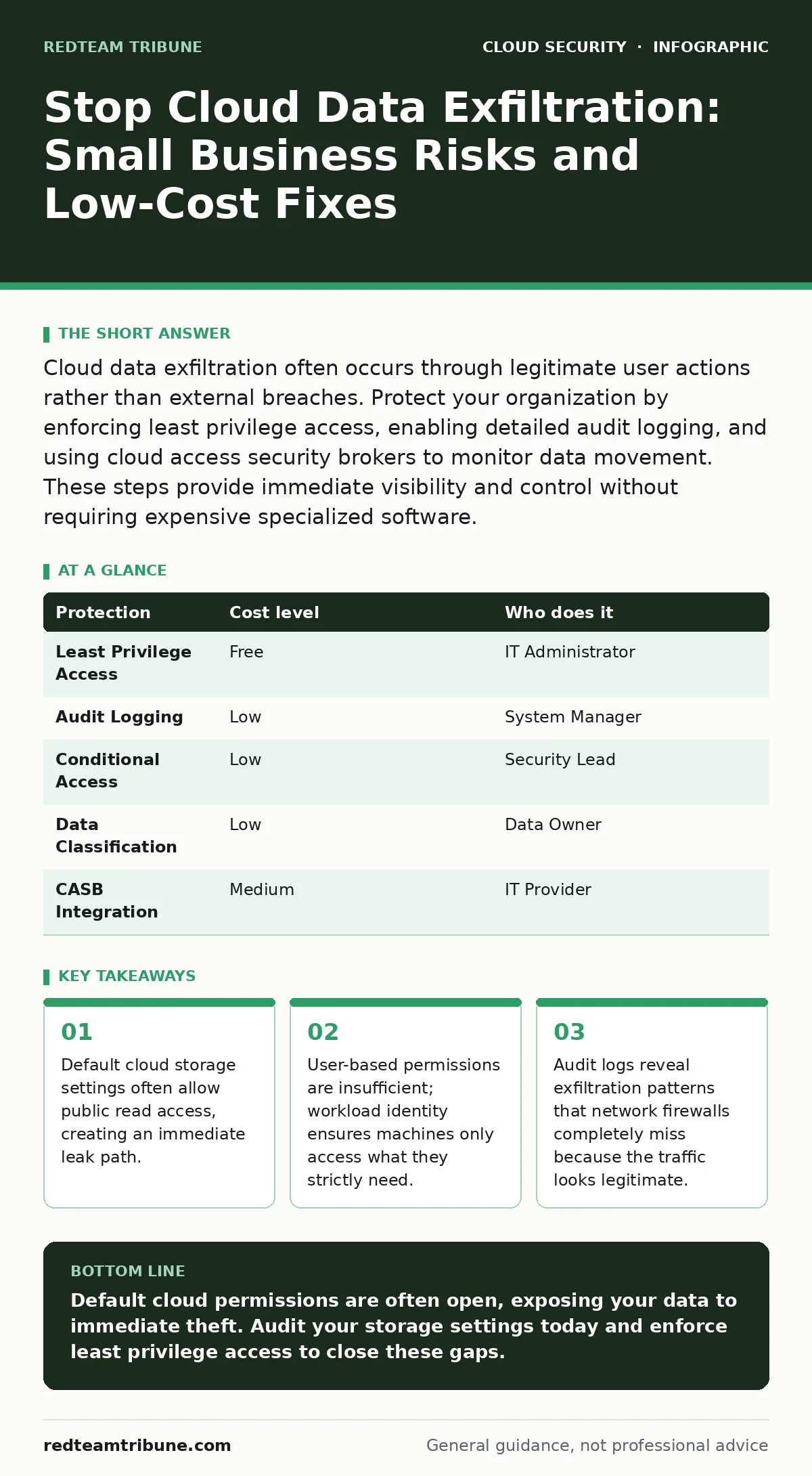
Cloud data exfiltration often occurs through legitimate user actions rather than external breaches. Protect your organization by enforcing least privilege access, enabling detailed audit logging, and using cloud access security brokers to monitor data movement. These steps provide immediate visibility and control without requiring expensive specialized software.
The Hidden Cost of Default Permissions
Small organizations frequently inherit dangerous defaults from cloud providers. These platforms prioritize ease of use, meaning new storage containers often start with broad access rights. You assume data is private until you explicitly secure it. This assumption is incorrect. The default state is often open. When you create a storage account, the system grants the creator full control. If you share the link with a colleague, you might unintentionally grant access to anyone who finds the URL.
This exposure happens because small teams lack dedicated security staff. You rely on generalist IT support or managed service providers who may not review cloud-specific configurations. The result is a perimeter that looks solid but has wide-open doors for data exit. You must treat every new cloud resource as compromised until you verify its access controls. This mindset shift prevents the majority of accidental data leaks.
Why Small Teams Face Higher Exfiltration Risk
Small organizations operate with fewer checks and balances. One person often holds the administrative keys for finance, operations, and cloud infrastructure. This consolidation creates a single point of failure. If that account is compromised, an attacker gains immediate, unrestricted access to all cloud resources. There is no secondary approval process to stop mass data downloads.
You also face insider threats that differ from large corporations. In a small team, employees know where critical data lives. A disgruntled staff member can copy files before leaving, and without granular logging, you may not notice until months later. The lack of visibility is the real risk. You cannot protect what you cannot see. Most small businesses rely on basic antivirus tools that do not monitor cloud API calls or storage object changes.
Another factor is the speed of deployment. Development teams push code and data to the cloud rapidly. Security reviews often happen after deployment, if at all. This gap allows misconfigurations to persist for weeks. You need to integrate security into the deployment pipeline. Understanding DevSecOps principles helps you catch these errors before they reach production environments.
Low-Cost Protections That Actually Work
You do not need enterprise-grade software to stop data theft. Built-in cloud features provide strong protection if you enable them correctly. The first step is enforcing least privilege access. Every user and application should have the minimum permissions necessary to perform their job. Review these permissions quarterly. Remove access for employees who change roles or leave the company.
Enable detailed audit logging for all cloud storage accounts. These logs record who accessed data, when, and from where. They are often free or included in basic support tiers. Reviewing these logs regularly helps you establish a baseline of normal activity. Any deviation, such as a large download at 3 AM, becomes immediately visible. You can set up automated alerts for these anomalies.
Use conditional access policies to restrict where data can be accessed. You can block downloads from unmanaged devices or countries where your business does not operate. This adds a layer of friction for attackers without hindering legitimate users. Combining these measures creates a defense-in-depth strategy that is hard to bypass. Refer to our guide on cloud compliance to ensure these settings meet regulatory requirements for your industry.
| Protection | Cost level | Who does it |
|---|---|---|
| Least Privilege Access | Free | IT Administrator |
| Audit Logging | Low | System Manager |
| Conditional Access | Low | Security Lead |
| Data Classification | Low | Data Owner |
| CASB Integration | Medium | IT Provider |
The Limitations of Traditional Security Tools
Traditional network firewalls struggle with cloud data exfiltration. They inspect traffic at the network edge but cannot see inside encrypted cloud connections. When a user downloads a file via HTTPS, the firewall sees only an encrypted tunnel. It cannot determine if the file is sensitive or benign. You need tools that understand cloud API calls and object-level actions.
This is where cloud detection and response platforms become valuable. They monitor for suspicious behavior patterns within the cloud environment itself. They can detect a user downloading 500 files in ten minutes and block the action. Traditional antivirus software on endpoints does not provide this level of cloud-specific insight. You must layer endpoint protection with cloud-native monitoring for complete coverage.
Another blind spot is service accounts. Applications often use service accounts to access data. These accounts rarely have human oversight. If an attacker compromises an application, they inherit the service account's permissions. This allows them to exfiltrate data without triggering user-based alerts. You must apply workload identity standards to ensure these accounts have strict, time-bound permissions.
Misconfigurations That Invite Data Theft
Storage buckets are the most common source of accidental exposure. Administrators often confuse "private" with "unlisted." A bucket might be unlisted, meaning it does not appear in public searches, but it is still accessible if someone guesses the URL. You must explicitly set permissions to "deny public read" and "deny public write." Do not rely on obscurity for security.
Another frequent error is over-permissive IAM roles. Identity and Access Management roles define what actions a user or service can perform. Assigning "Admin" rights to a development team is convenient but dangerous. If one developer's account is compromised, the attacker gains full control. Use role-based access control to segment permissions. Our guide on Kubernetes RBAC offers specific strategies for managing these roles in containerized environments.
Shared keys and API tokens are another vulnerability. Hardcoding these credentials in source code repositories is a common mistake. Attackers scrape public code repositories for these secrets. Once found, they can access your cloud storage directly. Use a secrets management system to store and rotate these credentials automatically. This prevents long-term exposure if a repository becomes public.
See also: 7 Common CASB Mistakes That Create Blind Spots · Federated Identity vs SSO: The Architectural Difference That Matters
What to Ask Your IT Provider
If you outsource your cloud management, you must verify their security practices. Do not assume they follow best standards. Ask specific questions about their monitoring and response capabilities. A vague promise of "security" is insufficient. You need concrete details about how they protect your data in transit and at rest.
- How do you audit cloud storage permissions for public exposure?
- What tools do you use to monitor for anomalous data downloads?
- How quickly can you revoke access for a compromised account?
- Do you implement cloud access security brokers (CASB) to enforce data loss prevention policies?
- How do you manage and rotate service account credentials?
Your provider should offer transparent answers. If they cannot explain their monitoring process, you are at risk. You may need to switch to a provider that specializes in cloud security. Look for partners who understand Kubernetes admission controllers if you use container orchestration, as these tools enforce security policies before workloads run.
Building a Sustainable Security Culture
Technology alone cannot stop data exfiltration. You need a culture where security is everyone's responsibility. Train employees to recognize phishing attempts that lead to account compromise. Teach them to report unusual system behavior.
Regularly review and update your security policies. Cloud services change frequently. New features may introduce new risks. Schedule quarterly reviews with your IT provider to assess your current posture. Test your incident response plan to ensure you can react quickly to a breach. Simulation exercises reveal gaps in your detection and response capabilities.
Remember that security is a continuous process. There is no final state of "secure." You must adapt to new threats and technologies. By combining technical controls with human awareness, you create a resilient organization. Protecting your data is an investment in your business's longevity.
Key takeaways
- Default cloud storage settings often allow public read access, creating an immediate leak path.
- User-based permissions are insufficient; workload identity ensures machines only access what they strictly need.
- Audit logs reveal exfiltration patterns that network firewalls completely miss because the traffic looks legitimate.
Default cloud permissions are often open, exposing your data to immediate theft. Audit your storage settings today and enforce least privilege access to close these gaps.
Frequently asked questions
How do I know if my cloud storage is publicly accessible?
Use your cloud provider's built-in configuration checkers or third-party scanning tools to identify buckets with public read or write permissions.
Can a firewall stop cloud data exfiltration?
Standard firewalls cannot inspect encrypted cloud traffic or API calls, so they miss most cloud-based exfiltration attempts.
What is the cheapest way to monitor for data leaks?
Enable native cloud audit logging and set up alerts for large volume downloads or access from unusual locations.
How often should I review user permissions?
Review permissions quarterly or immediately when an employee changes roles or leaves the organization to remove unnecessary access.
How this guide was produced: written by the RedTeam Tribune editorial team with AI assistance, checked against the public references listed below, and reviewed when the facts change. See our editorial policy or report an error.