Self-Hosted GitLab Vulnerability Myths: What Actually Compromises Your Instance
Most self-hosted GitLab breaches stem from misconfiguration and exposed services, not zero-day exploits in the core codebase.
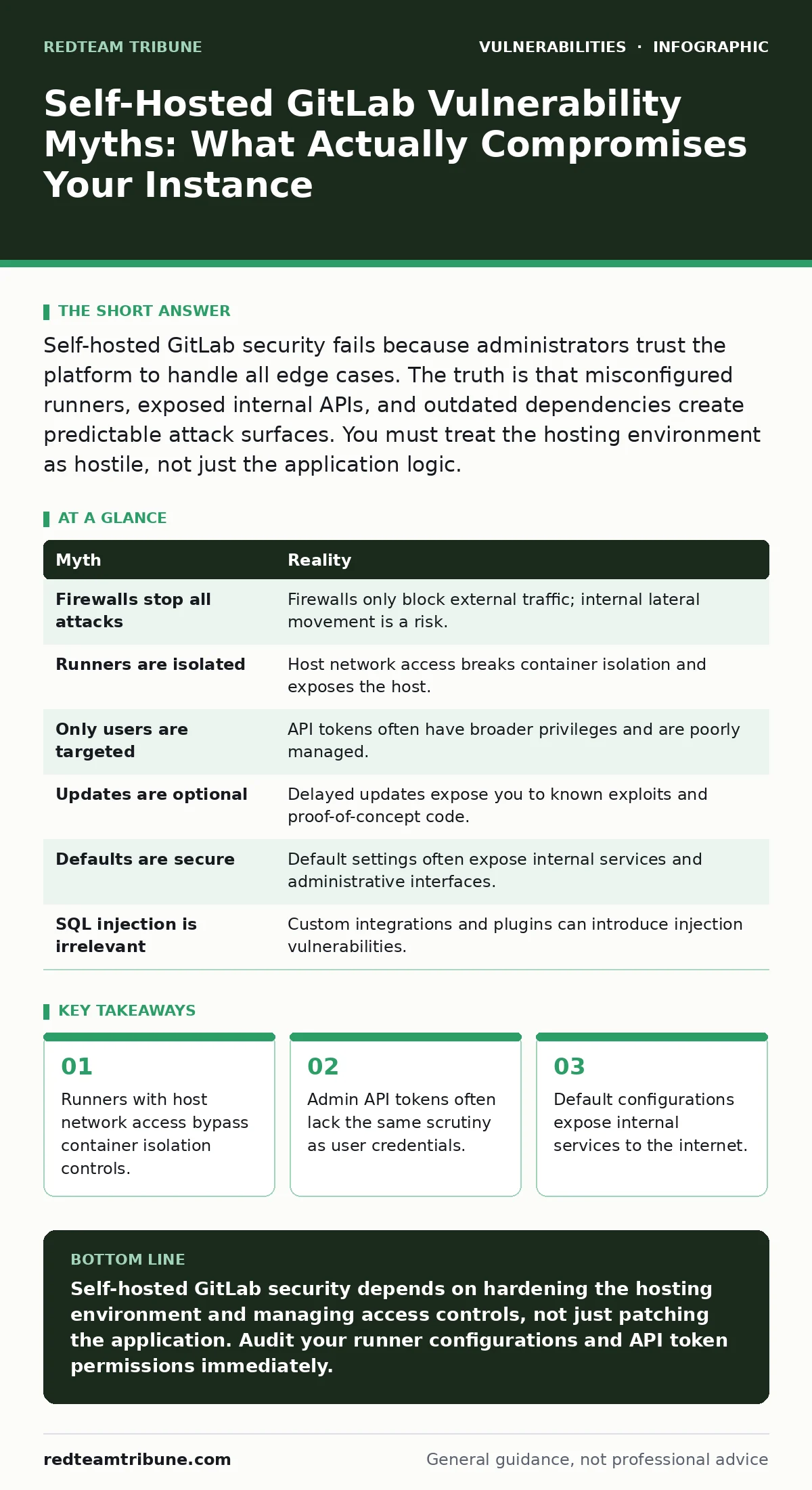
Self-hosted GitLab security fails because administrators trust the platform to handle all edge cases. The truth is that misconfigured runners, exposed internal APIs, and outdated dependencies create predictable attack surfaces. You must treat the hosting environment as hostile, not just the application logic.
Myth: The GitLab Instance Is Secure If It Is Behind a Firewall
Reality: Firewalls do not protect internal services from compromised components within the same network segment. Imagine a runner that executes a malicious build script. If that runner has access to the host network, it can reach the GitLab database or other internal services directly. The firewall only blocks external traffic. It does not stop lateral movement from an insider threat or a compromised CI/CD pipeline.
You must assume that any process running on your infrastructure can attempt to access any other process. Network segmentation is the only control that limits this blast radius. Isolating the GitLab application, the database, and the CI runners into separate network zones prevents a breach in one component from compromising the others. This adds complexity to your deployment but removes the single point of failure.
Myth: GitLab Runners Are Fully Isolated From the Host System
Reality: Container isolation relies on the host kernel and correct configuration. Many administrators deploy runners with default settings that grant excessive privileges. When a runner is configured to use the host network mode, it shares the network namespace of the host machine. This breaks the boundary between the build environment and the host. An attacker who controls the repository code can inject commands that reach the host.
You need to verify runner configurations regularly. Check for the use of privileged containers or host network modes. These settings are often required for specific hardware access or complex testing but create a direct path to the host. If you do not need these privileges, remove them. Use ephemeral runners that spin up fresh environments for each job. This ensures that state does not persist between builds and limits the impact of a compromised job.
Myth: Only External Users Can Exploit Authentication Flaws
Reality: Internal API tokens and service accounts are frequent targets for attackers. These tokens often have broader permissions than standard user accounts. They are used for automation, integrations, and third-party tools. Administrators frequently generate these tokens with excessive privileges to avoid permission errors. This creates a high-value target for anyone who gains access to the token storage.
You must treat API tokens with the same rigor as user passwords. Rotate them regularly and limit their scope. A token for a backup script should not have write access to user profiles. Review token permissions periodically. Remove tokens that are no longer used. This reduces the number of valid credentials an attacker can misuse. Monitoring for unusual API activity helps detect compromised tokens early.
Myth: Updating GitLab Is Only Necessary When a Critical CVE Is Published
Reality: Delaying updates increases the window of exposure to known vulnerabilities. Attackers scan for outdated versions of popular software. They exploit known flaws that have publicly available proof-of-concept exploits. Waiting for a critical severity rating means you are running code that has known weaknesses. These weaknesses may not be critical in all contexts but can be chained to achieve full compromise.
You should establish a regular update cadence. Test updates in a staging environment before applying them to production. This reduces the risk of breaking changes. Automated patch management tools can help enforce this schedule. However, manual verification is still required. You must ensure that custom configurations and plugins are compatible with the new version. Neglecting minor updates leaves you vulnerable to low-hanging fruit for attackers.
Myth: Default Security Configurations Are Sufficient for Production Use
Reality: Default settings prioritize ease of installation over security. They often expose administrative interfaces and internal services to the internet. Administrators assume that the vendor has hardened the software. This assumption fails when the default configuration allows directory listing exposure or unauthenticated access to certain endpoints. You must audit the configuration after installation.
You need to disable unnecessary features. Turn off guest accounts if you do not need them. Restrict access to the administration console. Use strong authentication methods. Review the web server configuration to ensure that sensitive files are not accessible. Default configurations are a starting point, not a final state. Customizing them to your specific threat model is required for adequate protection.
Myth: GitLab Does Not Need Protection Against SQL Injection
Reality: While the core application is hardened, custom integrations and extensions can introduce SQL injection vulnerabilities. Administrators often write custom scripts or use third-party plugins that interact with the database. These components may not follow secure coding practices. They may concatenate user input into SQL queries. This creates a direct path for attackers to manipulate the database.
You must review all custom code that interacts with the database. Use parameterized queries to prevent injection. Validate and sanitize all user input. Assume that any input from the user is malicious. This mindset applies to both web forms and API endpoints. Regular code reviews and automated security scanning can help identify these flaws. Protecting against SQL injection requires vigilance beyond the core application.
| Myth | Reality |
|---|---|
| Firewalls stop all attacks | Firewalls only block external traffic; internal lateral movement is a risk. |
| Runners are isolated | Host network access breaks container isolation and exposes the host. |
| Only users are targeted | API tokens often have broader privileges and are poorly managed. |
| Updates are optional | Delayed updates expose you to known exploits and proof-of-concept code. |
| Defaults are secure | Default settings often expose internal services and administrative interfaces. |
| SQL injection is irrelevant | Custom integrations and plugins can introduce injection vulnerabilities. |
Key takeaways
- Runners with host network access bypass container isolation controls.
- Admin API tokens often lack the same scrutiny as user credentials.
- Default configurations expose internal services to the internet.
Self-hosted GitLab security depends on hardening the hosting environment and managing access controls, not just patching the application. Audit your runner configurations and API token permissions immediately.
Frequently asked questions
How do I limit runner network access?
Configure runners to use bridge networking instead of host networking. This isolates the runner from the host network and other containers.
Can I use virtual patching for GitLab?
Virtual patching can mitigate known vulnerabilities while you prepare for a full update. It provides a temporary layer of protection at the network level.
What are the risks of prototype pollution in GitLab?
Prototype pollution can allow attackers to modify object properties in JavaScript-based components. This can lead to unauthorized actions or data exposure.
How do I detect mass assignment vulnerabilities?
Review your API endpoints for unfiltered input. Ensure that only allowed fields can be updated by users. This prevents attackers from setting sensitive attributes.
How this guide was produced: written by the RedTeam Tribune editorial team with AI assistance, checked against the public references listed below, and reviewed when the facts change. See our editorial policy or report an error.