GitHub Actions Workflow Injection Prevention Checklist
Dynamic context parsing in automation workflows allows attackers to execute arbitrary commands through pull request titles, creating a silent backdoor in your build pipeline that bypasses standard input validation.
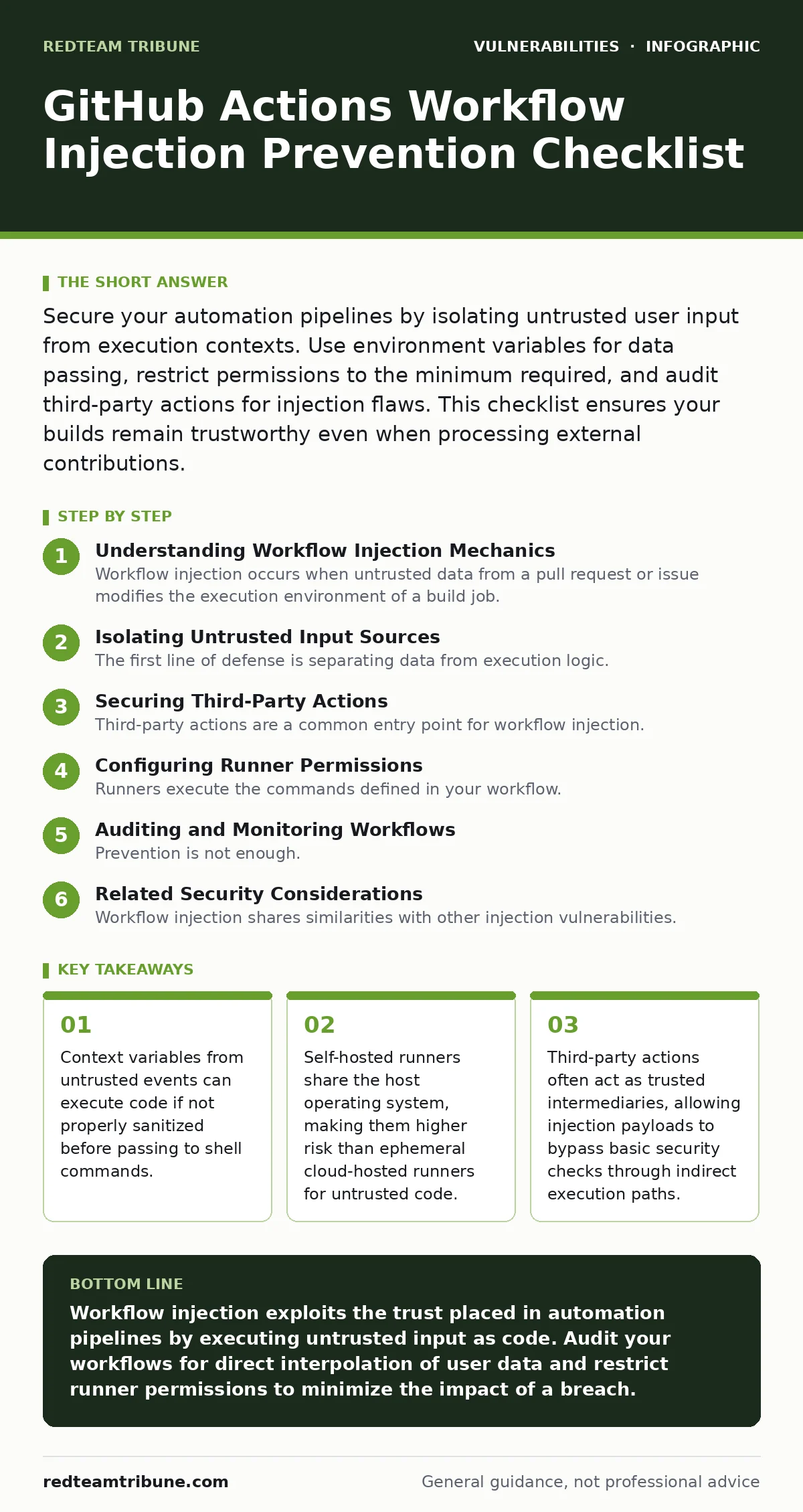
Secure your automation pipelines by isolating untrusted user input from execution contexts. Use environment variables for data passing, restrict permissions to the minimum required, and audit third-party actions for injection flaws. This checklist ensures your builds remain trustworthy even when processing external contributions.
Understanding Workflow Injection Mechanics
Workflow injection occurs when untrusted data from a pull request or issue modifies the execution environment of a build job. Attackers embed malicious commands in commit messages, branch names, or issue titles. When the workflow parses these values and passes them to a shell command, the system executes the injected code. This bypasses traditional input validation because the code runs as part of the trusted build process.
The danger lies in the implicit trust granted to workflow files. Developers assume the platform isolates user input from system commands. That assumption fails when string interpolation is used directly within command blocks. You must treat every external input as potentially executable code until proven otherwise.
Isolating Untrusted Input Sources
The first line of defense is separating data from execution logic. Never pass values from untrusted events directly into shell commands or environment variables that influence command construction. Use environment variables to pass data between steps, but ensure those variables are not used to construct new commands.
Imagine a workflow that prints the title of a pull request. If the title contains a newline followed by a command, the shell may execute that command. This is a classic injection vector. You must sanitize inputs or use safer methods to handle them.
- Avoid using ${{ github.event.pull_request.title }} in shell commands: Direct interpolation allows command execution through special characters in the title.
- Use environment variables for data passing: Variables are safer than direct string interpolation but still require careful handling to prevent injection.
- Validate input length and character sets: Restricting inputs to alphanumeric characters reduces the attack surface for injection attempts.
- Use dedicated actions for data processing: Specialized actions often handle sanitization better than custom shell scripts.
Securing Third-Party Actions
Third-party actions are a common entry point for workflow injection. These actions run with the permissions of the workflow, not the user who created the action. If an action processes user input incorrectly, it can execute malicious code on behalf of the repository owner.
You cannot trust an action simply because it is popular or well-known. Supply chain attacks often compromise trusted actions to inject malicious code into downstream workflows. You must audit the code of every action you use, especially those that handle user input.
- Pin actions to full commit SHAs: Using tags or branches allows attackers to modify the action code and redirect your workflow to malicious versions.
- Review action source code for input handling: Look for places where user input is passed to shell commands or system calls without sanitization.
- Limit the number of third-party actions: Each action increases the attack surface and potential for injection flaws in the supply chain.
- Use actions from verified publishers: Verified publishers undergo additional scrutiny, reducing the risk of compromised or malicious code.
Configuring Runner Permissions
Runners execute the commands defined in your workflow. The permissions granted to the runner determine what the workflow can access and modify. Overly permissive settings allow an attacker who injects code to access secrets, modify repository settings, or deploy malicious artifacts.
Self-hosted runners are particularly vulnerable because they share the host operating system. An injection on a self-hosted runner can compromise the entire server, not just the isolated build environment. You must restrict permissions and isolate runners to minimize the impact of a breach.
- Use least-privilege permissions for workflows: Grant only the specific permissions required for each job, avoiding broad access tokens.
- Isolate self-hosted runners: Use containers or virtual machines to isolate builds on self-hosted runners, preventing host system compromise.
- Disable internet access for build runners: Restricting network access prevents injected code from exfiltrating data or downloading additional payloads.
- Rotate runner credentials regularly: Frequent rotation limits the window of opportunity for an attacker who has compromised runner credentials.
Auditing and Monitoring Workflows
Prevention is not enough. You must continuously audit your workflows for new injection risks. New actions, updated dependencies, or changes in workflow logic can introduce vulnerabilities over time. Regular reviews ensure that security measures remain effective as your project evolves.
Monitoring logs for unusual activity can help detect injection attempts early. Look for unexpected commands, failed sanitization checks, or unusual network traffic from build runners. These signs may indicate an active injection attempt or a compromised workflow.
- Review workflow files during pull request reviews: Treat workflow changes as critical code changes that require rigorous security review.
- Monitor build logs for anomalies: Unusual commands or errors may indicate an injection attempt or a compromised action.
- Update actions and dependencies regularly: Keeping components up to date ensures you have the latest security patches and fixes.
- Implement automated security scanning: Use tools to scan workflows for known injection patterns and misconfigurations.
Related Security Considerations
Workflow injection shares similarities with other injection vulnerabilities. Understanding these related topics can help you apply broader security principles to your automation pipelines. For example, the principles of input validation used to prevent SQL injection are directly applicable to workflow injection. Similarly, understanding time-of-check to time-of-use (TOCTOU) bugs helps you recognize race conditions in workflow execution.
Broken access control is another related concern. If an attacker can modify workflow files, they may bypass access controls to execute privileged commands. Vulnerabilities in self-hosted GitLab instances also highlight the risks of sharing host resources with untrusted code. CORS misconfigurations and logging library vulnerabilities are less directly related but illustrate the importance of secure configuration and dependency management. Virtual patching techniques can provide temporary protection while you remediate underlying injection flaws. Understanding vulnerability severity ratings helps you prioritize fixes based on potential impact.
Key takeaways
- Context variables from untrusted events can execute code if not properly sanitized before passing to shell commands.
- Self-hosted runners share the host operating system, making them higher risk than ephemeral cloud-hosted runners for untrusted code.
- Third-party actions often act as trusted intermediaries, allowing injection payloads to bypass basic security checks through indirect execution paths.
Workflow injection exploits the trust placed in automation pipelines by executing untrusted input as code. Audit your workflows for direct interpolation of user data and restrict runner permissions to minimize the impact of a breach.
Frequently asked questions
How does workflow injection differ from standard command injection?
Workflow injection occurs within the context of a trusted automation platform, allowing attackers to execute code with the privileges of the build system, often bypassing standard input validation.
Can pinning actions to SHAs prevent all injection attacks?
Pinning to SHAs prevents supply chain attacks via tag manipulation but does not protect against injection flaws within the action code itself or direct context variable interpolation.
Are GitHub-hosted runners safer than self-hosted runners?
GitHub-hosted runners are ephemeral and isolated, reducing the risk of persistent compromise. Self-hosted runners share the host OS, making them higher risk for untrusted code execution.
What is the first step to securing a vulnerable workflow?
Identify where untrusted input is passed to shell commands and replace direct interpolation with safer methods like environment variables or dedicated sanitization actions.
How this guide was produced: written by the RedTeam Tribune editorial team with AI assistance, checked against the public references listed below, and reviewed when the facts change. See our editorial policy or report an error.