How Sigma Rules Detect Threats: The Translation Mechanism Explained
Sigma rules function as abstract detection logic that must be translated into platform-specific queries before any data is ever scanned or analyzed.
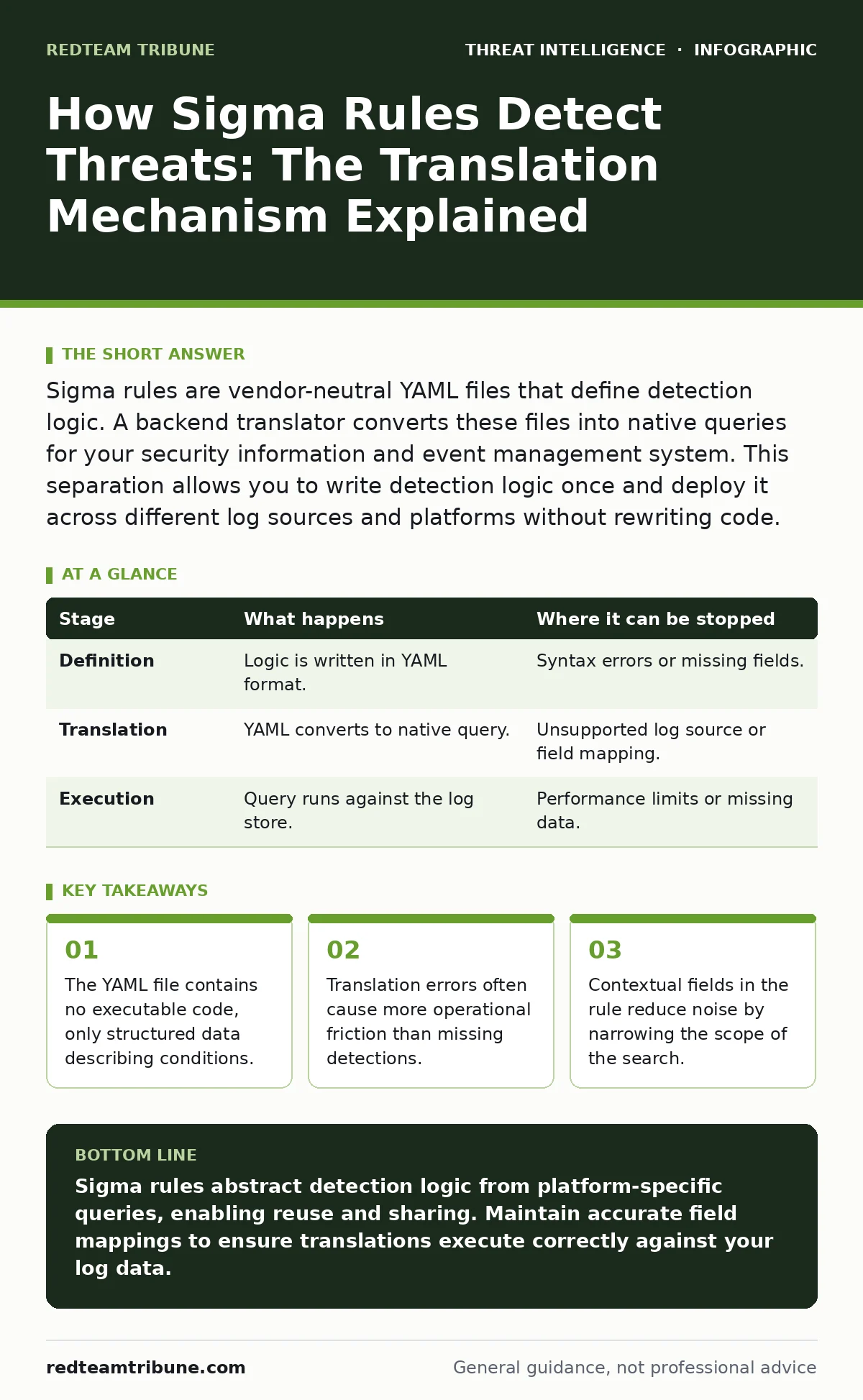
Sigma rules are vendor-neutral YAML files that define detection logic. A backend translator converts these files into native queries for your security information and event management system. This separation allows you to write detection logic once and deploy it across different log sources and platforms without rewriting code.
The Abstraction Layer
Sigma rules solve a persistent problem in security operations: log formats vary wildly between vendors. One platform stores user login data in a field called source_ip, while another uses clientAddress. Writing separate detection queries for every platform creates maintenance debt. Sigma abstracts this by providing a common language. You write the logic once in a standard format. The system handles the rest.
This approach separates detection strategy from implementation details. The rule describes what to look for, not how to query the database. This separation allows security teams to share detection logic freely. A rule written for a Linux server can be adapted for a Windows endpoint with minimal effort. The underlying data structure remains consistent, even if the storage mechanism changes.
Structure of the Rule
Every Sigma rule is a YAML file. YAML is a human-readable data serialization standard. The file is divided into distinct sections. The title and author fields provide metadata. The logsource section defines where the data comes from. The detection section defines the logic.
The logsource section is critical. It specifies the category and product of the log source. For example, a rule might target process_creation events on windows. This tells the translator which fields are available. If the translator does not recognize the log source, it cannot map the fields correctly. The detection section uses simple operators like equals, contains, or startswith. These operators combine into complex conditions.
Stage 1: Rule Definition
You begin by defining the detection logic. This stage happens on your local machine or in a version control system. You identify a specific behavior you want to detect. Perhaps you want to find a process that launches from a temporary directory. You write a YAML file that specifies this condition.
You must also define the fields you expect to find. If you reference a field that does not exist in the target log source, the rule will fail. This is a common error. The rule looks correct syntactically, but it targets non-existent data. You validate the YAML syntax at this stage. Tools can check for structural errors before you deploy anything.
| Stage | What happens | Where it can be stopped |
|---|---|---|
| Definition | Logic is written in YAML format. | Syntax errors or missing fields. |
| Translation | YAML converts to native query. | Unsupported log source or field mapping. |
| Execution | Query runs against the log store. | Performance limits or missing data. |
Stage 2: Translation to Native Query
This is where the magic happens. A backend component reads the Sigma rule. It looks up the logsource to find a mapping file. This mapping file tells the translator how Sigma field names correspond to the actual field names in your security information and event management system.
The translator generates a query in the native language of your platform. If you use a SQL-based system, it outputs SQL. If you use a proprietary query language, it outputs that syntax. This step is fragile. If the mapping file is outdated, the generated query will target the wrong fields. The query might return no results, or it might return garbage. You must maintain accurate mappings for every data source you monitor.
Stage 3: Execution and Correlation
The native query executes against your log store. The system scans the data for matches. If the condition is met, an alert is generated. This stage depends entirely on data availability. If the logs are not being collected, the rule does nothing. If the logs are delayed, the alert is delayed.
Sigma rules can also chain detections. One rule might detect a suspicious process. Another rule might detect a network connection from that process. By linking these rules, you reduce noise. You only alert when both conditions occur. This requires a system that can correlate events over time. Not all platforms support this natively. You may need to build custom logic to connect the dots.
See also: Why Is Spear Phishing Difficult to Detect: The Hidden Mechanics · Implement Network Traffic Analysis: A Step-by-Step Operational Guide
Limits of the Framework
Sigma rules are not a silver bullet. They depend on the quality of your data. If your logs lack context, the rules cannot provide insight. A rule might detect a process running, but it cannot tell you if that process is benign or malicious without additional context. This is where understanding adversary behavior matters. See our guide on adversary emulation to understand how attackers operate in real environments.
Another limit is performance. Complex rules with many conditions can slow down your query engine. If you deploy too many rules, your system may struggle to keep up. You must balance coverage with speed. Disabling unused rules helps, but identifying them requires regular review.
Handling False Positives
No detection system is perfect. Sigma rules often generate false positives. A rule might flag a legitimate administrative task as malicious. This happens because the rule looks for patterns, not intent. You must tune the rules to fit your environment.
Tuning involves adjusting the conditions. You might add exclusions for known good processes. You might narrow the scope to specific users or groups. This requires deep knowledge of your infrastructure. See our guide on false positives in threat detection for strategies to reduce noise without losing visibility. Ignoring false positives leads to alert fatigue. Your team will stop responding to alerts entirely.
Integration with Intelligence
Sigma rules work best when fed by threat intelligence. Intelligence feeds provide indicators of compromise, such as malicious IP addresses or file hashes. You can convert these indicators into Sigma rules. This automates the detection of known threats.
However, indicators expire quickly. A malicious IP address may be clean tomorrow. You need a system to retire old rules automatically. Manual cleanup is unsustainable. See our guide on threat intelligence sharing to learn how to integrate feeds effectively. Relying solely on static rules leaves you vulnerable to new tactics.
Maintenance and Evolution
Detection logic decays over time. Operating systems change. Applications update. Fields disappear or change names. You must update your Sigma rules regularly. This is not a one-time task. It is an ongoing process.
You should test new rules in a staging environment before deploying them to production. This allows you to verify the translation and check for false positives. You should also review existing rules periodically. Disable rules that no longer provide value. This keeps your system lean and responsive.
Beyond Basic Detection
Sigma rules are a foundation, not a ceiling. They provide a standardized way to express detection logic. But they do not replace human analysis. You still need to investigate alerts and determine their significance.
You can extend Sigma with custom backends. If your platform has unique capabilities, you can write a translator that leverages them. This allows you to use Sigma’s abstraction while still accessing advanced features. See our guide on network traffic analysis to understand how flow data complements log-based detection. Combining multiple data sources provides a fuller picture of an incident.
Key takeaways
- The YAML file contains no executable code, only structured data describing conditions.
- Translation errors often cause more operational friction than missing detections.
- Contextual fields in the rule reduce noise by narrowing the scope of the search.
Sigma rules abstract detection logic from platform-specific queries, enabling reuse and sharing. Maintain accurate field mappings to ensure translations execute correctly against your log data.
Frequently asked questions
Can Sigma rules detect fileless malware?
Yes, if the malware leaves behavioral traces in logs, such as unusual process creation or registry modifications. Sigma rules can target these behaviors.
Do I need programming skills to write Sigma rules?
No, you need to understand YAML syntax and the log fields available in your environment. Basic logic skills are sufficient for most rules.
How do I handle rules for cloud environments?
Use cloud-specific log sources in the Sigma rule. Ensure your backend translator supports cloud platforms like AWS CloudTrail or Azure Activity Logs.
Are Sigma rules compatible with all SIEMs?
Most major SIEMs have community-maintained backends. Check if your platform has an official or community-supported translator before relying on Sigma.
How this guide was produced: written by the RedTeam Tribune editorial team with AI assistance, checked against the public references listed below, and reviewed when the facts change. See our editorial policy or report an error.