Dynamic Malware Analysis for Small Teams: Practical Execution
Running suspicious files in isolated environments reveals behavioral threats that static signature scanners consistently miss during early infection stages.
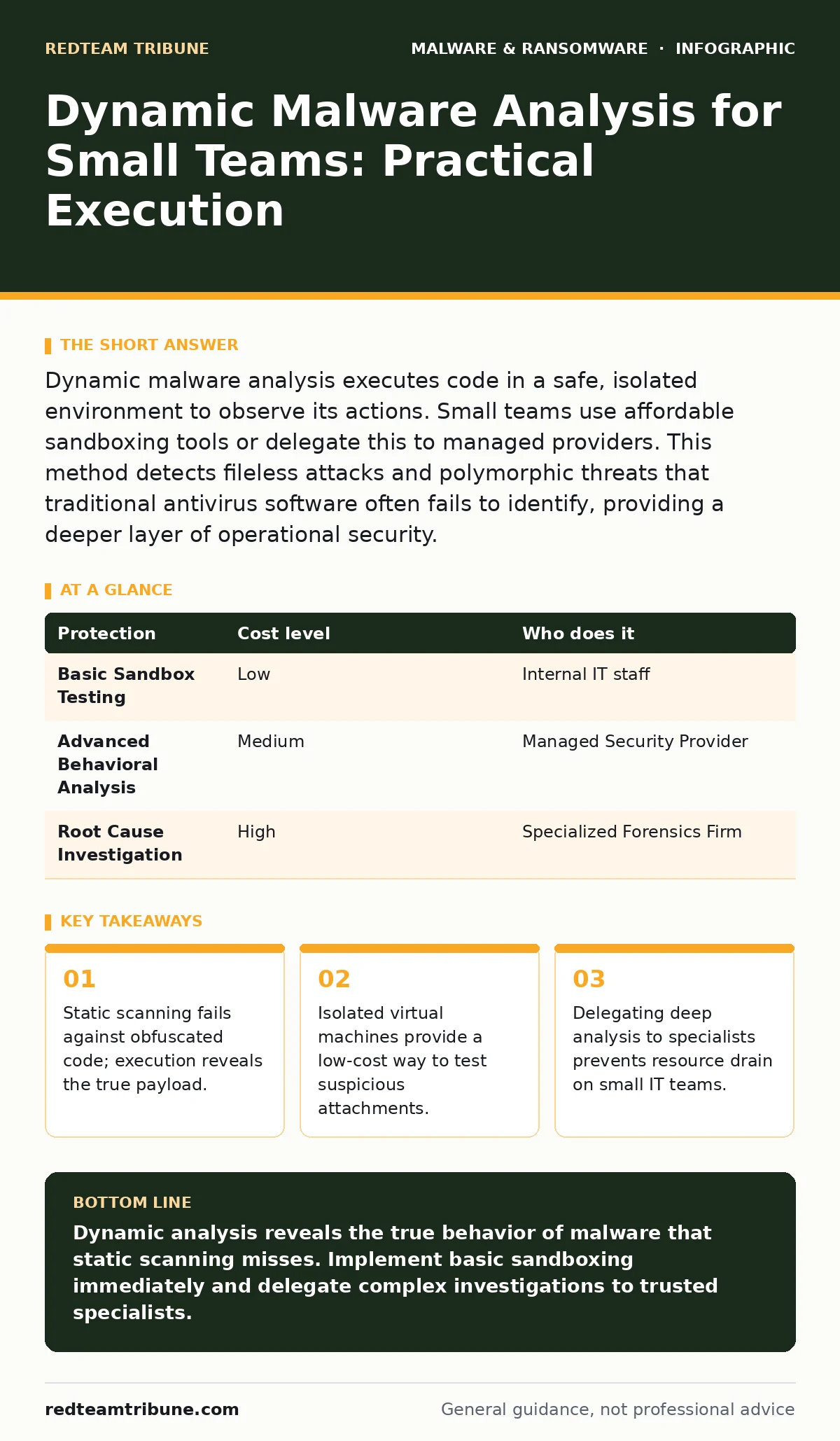
Dynamic malware analysis executes code in a safe, isolated environment to observe its actions. Small teams use affordable sandboxing tools or delegate this to managed providers. This method detects fileless attacks and polymorphic threats that traditional antivirus software often fails to identify, providing a deeper layer of operational security.
The Limitations of Static Scanning
Static analysis examines a file’s code without running it. It compares file hashes and signatures against known databases of malicious software. This method is fast and requires minimal computing resources. However, it fails when attackers change the appearance of the malware.
Attackers use techniques to hide the true nature of their code. This process is known as malware obfuscation. By encrypting or packing the code, the file looks different each time it is created. Static scanners see a new, unknown file every time. They cannot recognize the threat because the signature does not match any known record.
This is where dynamic malware analysis becomes necessary. It involves running the suspicious file in a controlled environment. You watch what the program does, not just what it looks like. This approach reveals the intent behind the code, regardless of how it is disguised.
Why Small Organizations Need Behavioral Insight
Large enterprises have dedicated security operations centers. They can afford expensive hardware and specialized staff to monitor network traffic. Small organizations often rely on basic antivirus solutions. These solutions are reactive. They wait for a signature to be published before blocking a threat.
By the time a signature is published, the malware may have already executed. Imagine a screen locker ransomware variant that encrypts files before locking the screen. If your antivirus does not recognize the specific variant, the damage occurs before detection. Dynamic analysis allows you to see the encryption behavior in real-time.
Small teams also face a higher risk per employee. A single compromised account can expose the entire organization. You cannot afford to wait for a breach to understand the threat. Observing behavior gives you an early warning system. It shifts your posture from reactive to proactive.
Affordable Sandboxing Methods
You do not need enterprise-grade hardware to perform dynamic analysis. You can use virtualization software to create isolated environments. These environments are called sandboxes. They mimic a real computer but are disconnected from your primary network.
When you run a suspicious file in a sandbox, any changes it makes are contained. If the file deletes system files or connects to a command-and-control server, it happens only inside the virtual machine. You can then analyze the logs to understand the threat.
Many virtualization platforms offer free or low-cost versions. These are sufficient for basic analysis. You create a snapshot of a clean system. You run the sample. You then revert to the snapshot. This process is repeatable and leaves no trace on your host machine.
Handling Specific Threat Vectors
Different malware types require different analysis approaches. Email threats are the most common entry point. Email attachment scanning often catches known viruses. It frequently misses new or customized attacks. You should test suspicious attachments in a sandbox before opening them on your main device.
Some malware hides inside documents. Macro malware uses scripting languages within office files to execute commands. When you open the file in a sandbox, you can see if it attempts to enable macros or download additional payloads. This behavior is a clear indicator of malicious intent.
Mobile devices are also targets. Android malware often disguises itself as legitimate apps. Testing APK files in an emulator allows you to see what permissions the app requests and what data it transmits. This helps you identify spyware or adware before installation.
When to Delegate Analysis
Dynamic analysis requires time and skill. Interpreting logs and understanding system calls is complex. For small teams, this can distract from core business operations. You may lack the expertise to identify subtle indicators of compromise.
In these cases, delegation is the most efficient path. You can outsource deep analysis to managed service providers. They have the tools and experience to handle complex threats. They can also provide detailed reports on the behavior of the malware.
This approach balances cost and security. You retain control over your immediate response. You leverage specialized knowledge for deep investigation. It ensures that your team focuses on maintaining operations while experts handle the technical details.
| Protection | Cost level | Who does it |
|---|---|---|
| Basic Sandbox Testing | Low | Internal IT staff |
| Advanced Behavioral Analysis | Medium | Managed Security Provider |
| Root Cause Investigation | High | Specialized Forensics Firm |
Integrating with Broader Security
Dynamic analysis is not a standalone solution. It works best when combined with other security measures. For instance, business continuity planning ensures you can recover from an incident. Analysis helps you understand the incident to improve your plan.
You should also consider keyloggers and point-of-sale malware. These threats steal data silently. Dynamic analysis can reveal if a program is recording keystrokes or intercepting transaction data. This insight allows you to block the threat before it exfiltrates sensitive information.
Regular testing keeps your defenses sharp. You should periodically test your sandboxing procedures. Ensure that your isolation holds. Verify that your logging captures the necessary details. This maintenance ensures your analysis capabilities remain effective over time.
Questions for Your IT Provider
If you delegate analysis, you need to verify their capabilities. Ask specific questions to ensure they meet your needs. Do not accept vague answers about "comprehensive protection." You need concrete details about their methodology.
- What tools do you use for dynamic analysis?
- How quickly can you isolate and test a suspicious file?
- Do you provide detailed behavioral reports?
- How do you handle false positives?
- Can you integrate findings into our existing security stack?
These questions help you assess their technical depth. They also clarify the scope of their service. You want a partner who understands the nuances of modern threats. They should be able to explain the behavior of the malware, not just block it.
Key takeaways
- Static scanning fails against obfuscated code; execution reveals the true payload.
- Isolated virtual machines provide a low-cost way to test suspicious attachments.
- Delegating deep analysis to specialists prevents resource drain on small IT teams.
Dynamic analysis reveals the true behavior of malware that static scanning misses. Implement basic sandboxing immediately and delegate complex investigations to trusted specialists.
Frequently asked questions
Is dynamic malware analysis legal?
Yes, analyzing malware in an isolated environment for security purposes is generally legal. Ensure you have the right to test the files and do not distribute the malware.
What is the difference between static and dynamic analysis?
Static analysis examines code without running it. Dynamic analysis runs the code in a safe environment to observe its actions.
How this guide was produced: written by the RedTeam Tribune editorial team with AI assistance, checked against the public references listed below, and reviewed when the facts change. See our editorial policy or report an error.