Data Inventory and Mapping: How to Track What You Cannot See
Most organizations lose track of sensitive data within 48 hours of creation because automated scanners miss context and human labels decay over time.

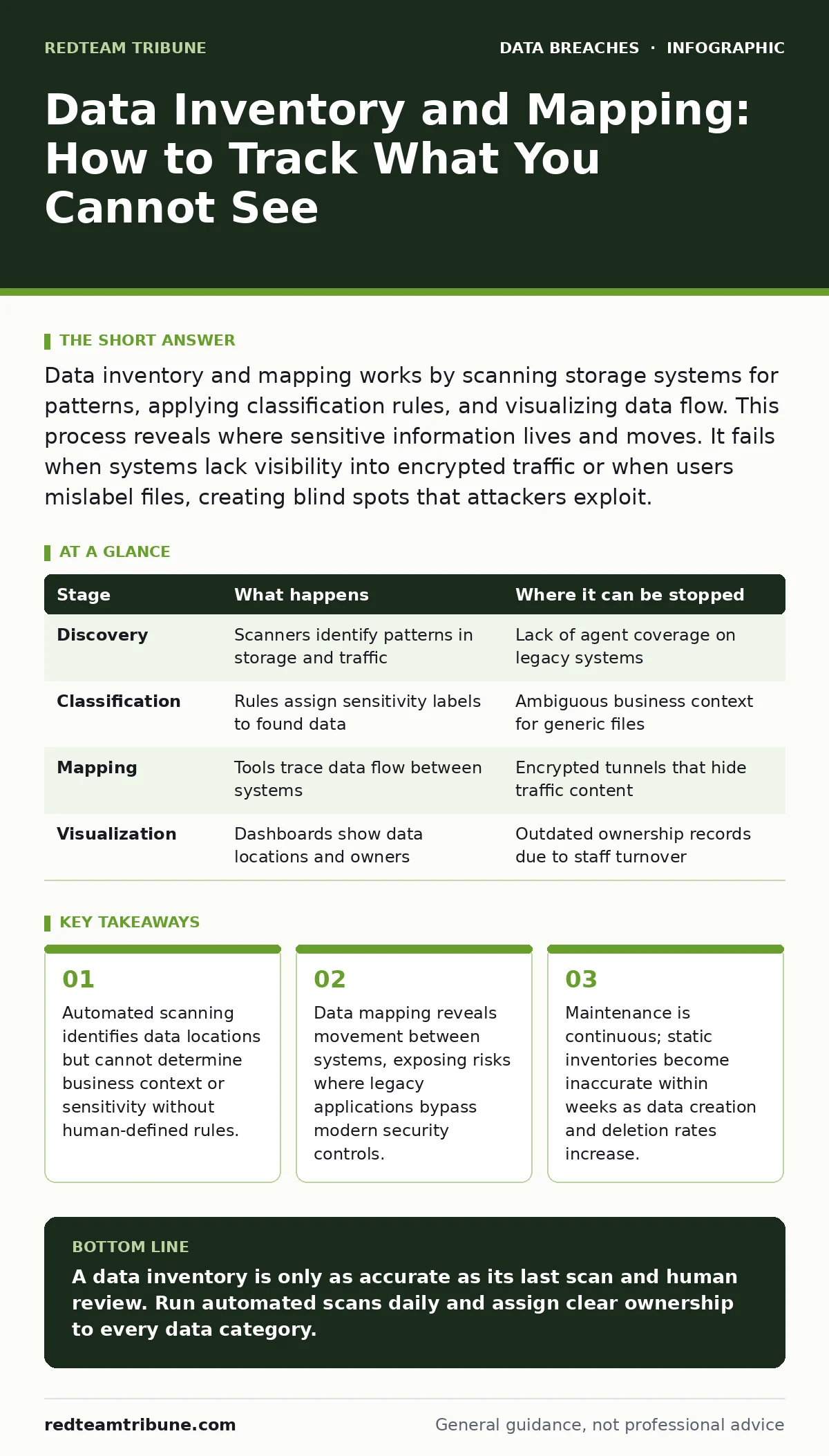
Data inventory and mapping works by scanning storage systems for patterns, applying classification rules, and visualizing data flow. This process reveals where sensitive information lives and moves. It fails when systems lack visibility into encrypted traffic or when users mislabel files, creating blind spots that attackers exploit.
The Foundation of Visibility
You cannot protect what you cannot see. Data inventory and mapping is the process of discovering, classifying, and tracking information across your infrastructure. This is not a one-time task. It is a continuous cycle of detection and verification. Most breaches occur because attackers find data that the organization forgot existed or misclassified.
Imagine a hospital storing patient records on a shared drive that was meant for temporary project files. Without an active inventory, those records remain unencrypted and unmonitored. An attacker who gains access to that drive finds high-value targets without triggering alerts. The inventory process prevents this by ensuring every byte of data has a known location and classification.
Stage 1: Discovery and Scanning
Stage 1: Automated Pattern Recognition
The first stage involves scanning storage systems, databases, and endpoints for known data patterns. Tools look for regular expressions that match credit card numbers, social security numbers, or email addresses. This is purely technical. The scanner does not understand the content. It only sees patterns that match predefined signatures.
This step happens behind the scenes. Agents installed on servers or network taps inspect traffic. They flag files that contain sensitive patterns. The system creates a raw list of potential data locations. This list is noisy. It includes false positives where patterns appear in test data or public documents. You must filter this noise before proceeding.
| Stage | What happens | Where it can be stopped |
|---|---|---|
| Discovery | Scanners identify patterns in storage and traffic | Lack of agent coverage on legacy systems |
| Classification | Rules assign sensitivity labels to found data | Ambiguous business context for generic files |
| Mapping | Tools trace data flow between systems | Encrypted tunnels that hide traffic content |
| Visualization | Dashboards show data locations and owners | Outdated ownership records due to staff turnover |
Stage 2: Classification and Context
Stage 2: Applying Business Rules
Discovery finds the data. Classification tells you what it is. This stage applies business rules to the raw findings. A file containing a string of numbers might be a test value or a live account number. Classification rules distinguish between them. These rules often require manual input or machine learning models trained on your specific data types.
You must define what constitutes sensitive data for your organization. A customer name is public information. A customer name paired with a purchase history is sensitive. The scanner cannot make this distinction alone. You provide the context. This step links technical findings to business risk. It determines which data requires encryption at rest and which can remain in plain text.
Stage 3: Mapping Data Flow
Stage 3: Tracing Movement and Dependencies
Data does not sit still. It moves from creation to storage, processing, and deletion. Mapping tracks this movement. It identifies which applications access the data and where it is transmitted. This reveals dependencies. You might find that a critical database feeds a legacy reporting tool that has no security controls.
This stage exposes the hidden paths of data. It shows where data leaves your network. It identifies third-party processors that handle your information. Without this map, you cannot enforce consistent security policies. You might secure the database but leave the API that exposes it wide open. Mapping ensures security follows the data, not just the storage container.
Stage 4: Visualization and Ownership
Stage 4: Assigning Responsibility and View
The final stage presents the findings in a usable format. Dashboards show where sensitive data lives and who owns it. Ownership is critical. Technology teams manage the infrastructure, but business units own the data. The inventory must assign a data steward to each category. This person is responsible for verifying the classification and approving access.
Visualization turns raw data into action. It highlights high-risk areas. It shows where data resides on unmanaged devices. It identifies data that is older than retention policies allow. This clarity allows you to prioritize remediation efforts. You focus on the most sensitive data in the most exposed locations.
See also: Compliance Audits Meaning: What They Are and Why They Fail
The Limits of Automation
Where the Process Fails
Automated tools have blind spots. They struggle with encrypted data. If traffic is encrypted end-to-end, scanners cannot inspect the payload. They see only the metadata. They cannot classify the content inside the tunnel. This is a fundamental trade-off. Privacy and security often conflict. You must decide whether to inspect traffic at the endpoint or trust the encryption.
Another limit is context. A scanner sees a file named "budget.xlsx". It does not know if it contains salary data or marketing spend. Human review is required for ambiguous cases. Without this review, the inventory becomes inaccurate. Inaccurate inventories give a false sense of security. Attackers exploit these false assumptions.
Maintenance and Decay
Keeping the Inventory Alive
Data changes daily. New files are created. Old files are deleted. Systems are updated. The inventory decays quickly. A static snapshot becomes obsolete within weeks. You must run scans regularly. Frequency depends on your data creation rate. High-volume environments need daily scans. Low-volume environments might manage with weekly scans.
You must also update classification rules. New data types emerge. New regulations change what is considered sensitive. Your rules must evolve. Review ownership assignments when staff leave. Reassign stewardship immediately. Stale ownership records create accountability gaps. These gaps are where breaches start.
Integration with Security Controls
Using the Inventory for Defense
The inventory is useless if it sits in a dashboard. You must integrate it with security controls. Use the classification data to enforce encryption. Apply access controls based on sensitivity. Block transfers of sensitive data to unapproved destinations. The inventory feeds these policies.
This integration creates a feedback loop. Security events update the inventory. If a file is accessed unusually, the system flags it. The steward reviews the flag. The classification is updated if needed. This dynamic approach keeps the inventory relevant. It turns passive discovery into active defense.
Preparing for Compliance
Aligning with Regulatory Requirements
Regulators require you to know what data you hold. They ask for evidence of classification and protection. The inventory provides this evidence. It shows that you have identified sensitive data and applied appropriate controls. This is central to compliance audits.
Without an inventory, you cannot prove compliance. You cannot answer questions about data location or retention. You risk penalties and loss of trust. The inventory is your primary defense against regulatory scrutiny. It demonstrates due care and systematic management.
RELATED: privacy impact assessments
Key takeaways
- Automated scanning identifies data locations but cannot determine business context or sensitivity without human-defined rules.
- Data mapping reveals movement between systems, exposing risks where legacy applications bypass modern security controls.
- Maintenance is continuous; static inventories become inaccurate within weeks as data creation and deletion rates increase.
A data inventory is only as accurate as its last scan and human review. Run automated scans daily and assign clear ownership to every data category.
Frequently asked questions
How often should I update my data inventory?
Run automated scans daily for high-volume environments and weekly for low-volume ones. Review classifications and ownership quarterly to ensure accuracy.
Can automated tools classify all my data?
No. Automated tools identify patterns but cannot determine business context. Human review is required for ambiguous data and sensitive business decisions.
What happens if I miss a data source?
Missed sources create blind spots. Attackers exploit these gaps to access unmonitored data. Regular scans and agent coverage minimize this risk. Q
How this guide was produced: written by the RedTeam Tribune editorial team with AI assistance, checked against the public references listed below, and reviewed when the facts change. See our editorial policy or report an error.