7 PyPI Package Mistakes That Invite Malware Into Your Build
Typosquatting and dependency confusion exploit your trust in open source, turning routine installations into silent backdoors that bypass traditional security controls.
You invite malware when you install packages without verifying their origin, ignore dependency updates, or use insecure network connections. Stop trusting implicit trust models. Audit every dependency, pin versions strictly, and verify package signatures before execution. This prevents supply chain compromises.
Mistake 1: Installing Packages Without Verifying Source
You assume that any package found on PyPI is safe because it passed a basic review. This assumption fails against typosquatting. Attackers register names that look nearly identical to popular libraries. You type a name incorrectly, or an attacker guesses a common misspelling. The package installs successfully. It contains no functional code for your project. Instead, it executes a hidden payload.
Why it hurts: The malicious package runs with the same permissions as your application. It can exfiltrate environment variables, API keys, or credentials stored in your configuration files. Because the package name looks legitimate, you rarely suspect it during manual code reviews. The damage occurs before you notice any performance degradation.
The fix: Verify the package name against the official repository of the library you intend to use. Check the project URL listed in the package metadata. Ensure it points to the expected source code repository. Do not rely solely on the package name. Cross-reference the maintainer’s identity with known contributors of the legitimate project.
Mistake 2: Ignoring Dependency Confusion Attacks
Your internal build system searches for packages in multiple locations. It checks your private registry first, then falls back to public registries like PyPI. An attacker registers a package name that matches your internal private package on PyPI. They set the version number higher than your current internal release. Your build system pulls the public package because it sees a newer version.
Why it hurts: The attacker gains access to your internal build environment. They can deploy code that runs during the build process. This allows them to inject backdoors into your final application artifacts. The compromise happens at the infrastructure level, not just the application level. You lose control over the software you distribute to customers.
The fix: Configure your package manager to prefer private registries exclusively. Disable fallback to public registries for internal package names. Use strict version pinning for internal dependencies. Ensure that private packages cannot be overwritten by public versions. This requires explicit configuration in your build tools to block external sources for internal scopes.
Mistake 3: Trusting Transitive Dependencies Blindly
You install a direct dependency that you trust. That package depends on other libraries. You do not audit those secondary or tertiary dependencies. An attacker compromises one of these lower-level packages. They inject malicious code into the next release. Your direct dependency updates to the compromised version. Your application now runs the attacker’s code.
Why it hurts: The attack surface expands exponentially. You cannot manually review every transitive dependency. The malicious code hides deep in the dependency tree. It may only activate under specific conditions, such as a particular operating system or runtime configuration. This makes detection difficult. The compromise persists until you update the root package.
The fix: Use a software bill of materials (SBOM) to track all dependencies. Monitor for security advisories related to transitive packages. Pin versions of critical dependencies to prevent unexpected updates. Consider using a proxy or mirror that filters packages for known vulnerabilities. This adds a layer of verification before packages reach your build environment.
Mistake 4: Using Outdated Package Managers
You use an old version of pip or your build tool. These older versions may lack security patches. They might not support modern cryptographic signatures. They may fall back to HTTP instead of HTTPS for package retrieval. This exposes your installation process to man-in-the-middle attacks. An attacker intercepts the connection and serves a malicious package.
Why it hurts: The integrity of the package cannot be verified. You receive code that was altered in transit. The package manager trusts the source because it cannot validate the signature. This bypasses all upstream security checks. You end up running code that was never intended for your environment. The risk is highest in isolated or air-gapped networks where updates are delayed.
The fix: Keep your package manager updated to the latest stable release. Enable hash-based verification for all installations. Require that packages are downloaded over encrypted connections. Configure your tool to reject packages that lack valid signatures. This ensures that the code you run matches the code published by the maintainer.
Mistake 5: Skipping Code Review for New Packages
You add a new library to speed up development. You do not review its source code. You assume the community has vetted it. Many packages have few maintainers and low download counts. This makes them easy targets for takeover. An attacker buys the domain or account associated with the package. They push a malicious update. You install it without checking.
Why it hurts: Abandoned packages often have unresolved security issues. They may contain deprecated cryptographic functions. They might lack proper input validation. An attacker can exploit these weaknesses to execute arbitrary code. The lack of active maintenance means no one patches the vulnerability. You inherit the risk of an unmaintained codebase.
The fix: Review the source code of any new package before integration. Check the last commit date and the number of contributors. Avoid packages with a single maintainer and low activity. Prefer well-established libraries with active community support. This reduces the likelihood of inheriting hidden vulnerabilities or malicious code.
Mistake 6: Running Builds With Excessive Privileges
Your build process runs with root or administrator privileges. The package installation script executes with these elevated rights. If the package contains malicious code, it runs with full system access. It can modify system files, install persistent backdoors, or access other user data. The principle of least privilege is ignored.
Why it hurts: The blast radius of a compromise is maximized. The attacker can alter the build environment to persist across builds. They can steal secrets stored in the environment. They can pivot to other systems connected to the build server. The damage extends beyond the single application being built. Recovery requires a full system rebuild.
The fix: Run package installations in a sandboxed environment. Use virtual environments or containers with minimal permissions. Restrict file system access to only the necessary directories. Ensure that the build user cannot modify system-level configurations. This limits the impact of any malicious code that might execute during installation.
Mistake 7: Ignoring Package Metadata Anomalies
You do not check the metadata of the packages you install. You ignore warnings about unusual upload patterns. You do not verify the author’s email or GitHub profile. Attackers often use newly created accounts to publish malicious packages. They may use generic names or descriptions that mimic popular tools. These anomalies are red flags.
Why it hurts: The lack of scrutiny allows malicious packages to blend in. You miss obvious signs of a fraudulent package. The attacker relies on your haste or negligence. The package installs and executes before you realize the mistake. The metadata provides critical context about the package’s legitimacy. Ignoring it removes your first line of defense.
The fix: Inspect package metadata before installation. Verify the author’s identity and history. Check for recent uploads from new accounts. Look for inconsistencies in the package description or documentation. Treat any package with suspicious metadata as untrusted. This simple check prevents many low-effort attacks.
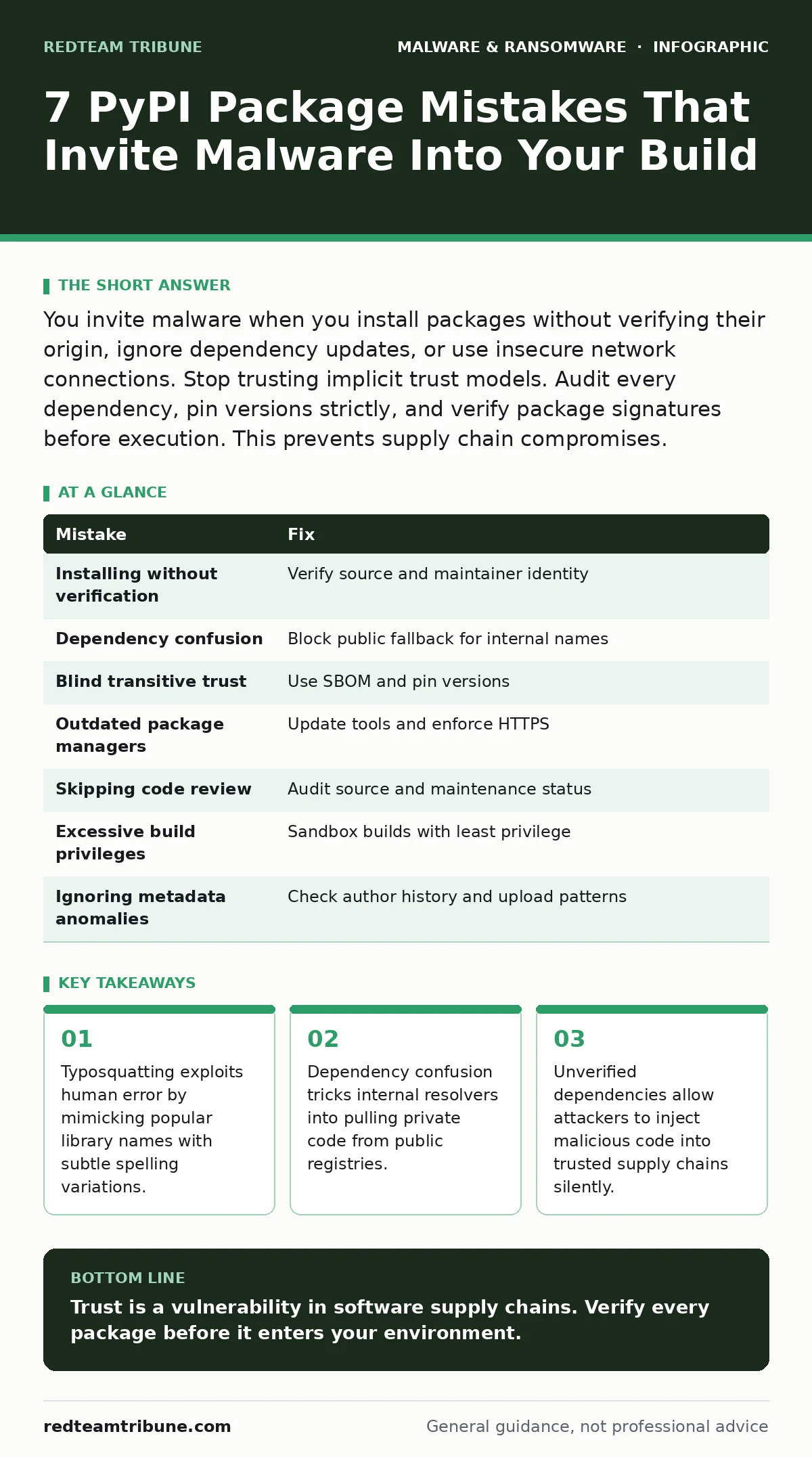
| Mistake | Fix |
|---|---|
| Installing without verification | Verify source and maintainer identity |
| Dependency confusion | Block public fallback for internal names |
| Blind transitive trust | Use SBOM and pin versions |
| Outdated package managers | Update tools and enforce HTTPS |
| Skipping code review | Audit source and maintenance status |
| Excessive build privileges | Sandbox builds with least privilege |
| Ignoring metadata anomalies | Check author history and upload patterns |
Key takeaways
- Typosquatting exploits human error by mimicking popular library names with subtle spelling variations.
- Dependency confusion tricks internal resolvers into pulling private code from public registries.
- Unverified dependencies allow attackers to inject malicious code into trusted supply chains silently.
Trust is a vulnerability in software supply chains. Verify every package before it enters your environment.
Frequently asked questions
How do I detect a typosquatted package?
Compare the package name carefully against the official library name. Check the project URL and maintainer details for discrepancies.
Can I use PyPI safely for internal projects?
Yes, if you configure your resolver to prefer internal registries and block public fallbacks for internal package names.
What is dependency confusion?
It is an attack where an attacker registers a package name on a public registry that matches an internal private package, tricking the build system into downloading the malicious public version.
Should I pin all package versions?
Pinning versions prevents unexpected updates that might include malicious code. It ensures reproducibility and reduces the risk of supply chain attacks.
How this guide was produced: written by the RedTeam Tribune editorial team with AI assistance, checked against the public references listed below, and reviewed when the facts change. See our editorial policy or report an error.